 Do Son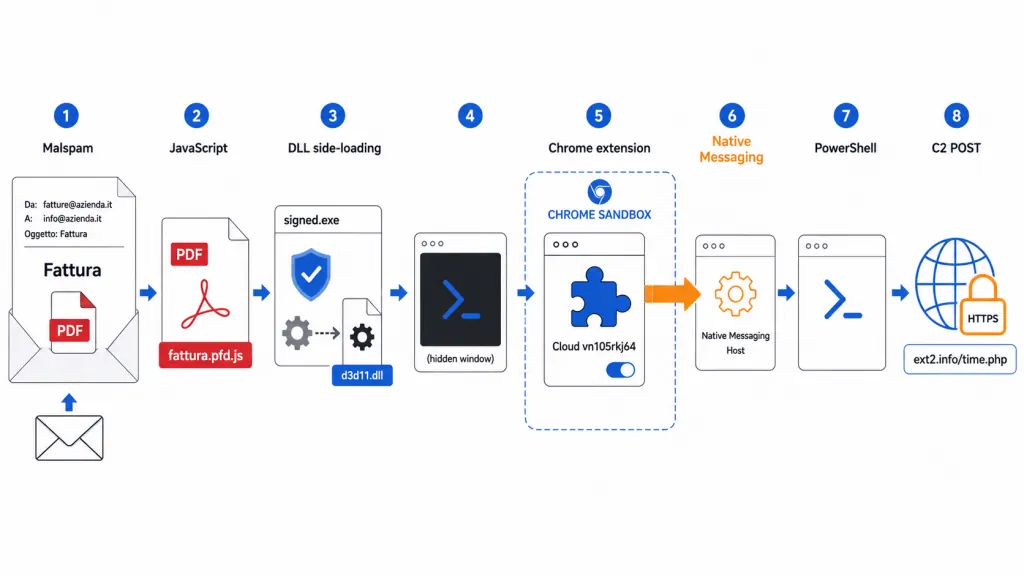
Image: D3Lab
At a Glance
| Malware type | Native Messaging backdoor with a malicious Chrome extension |
|---|---|
| Threat actor | Unattributed |
| Targets / victims | Italian-language email recipients |
| Delivery vector | Phishing email posing as an invoice, with a disguised JavaScript file |
| Key capabilities | Sandbox escape, PowerShell execution, cookie and browsing-data theft, remote commands |
| Source | D3Lab |
TL;DR
D3Lab analysed a June 2026 campaign that hit Italian users through fake invoice emails. The malware installed a Chrome extension and paired it with a Native Messaging Host. That combination formed a Native Messaging backdoor that let browser code run PowerShell on Windows. No known threat actor has been named.
Why It Matters
A browser extension normally cannot start local programs. This Native Messaging backdoor broke that boundary. As D3Lab put it, “Native Messaging changed that security boundary.” The result was a remote-command channel, not just a data stealer. Each part is a legitimate technology on its own. The danger comes from chaining them together.
Delivery
The campaign leaned on a simple lure. A short Italian email claimed a requested invoice was ready. Victims saw what looked like a PDF from an accounting office.
The download was actually an obfuscated Windows JavaScript file. Its name ended in “.pfd.js” to mimic a PDF at a glance. D3Lab noted the method is “simple, but effective,” since the victim expects a business document.
Infection Chain
The script dropped two files into the temporary folder. One was a signed Epic Games executable. The other was a malicious DLL loaded through side-loading.
That trusted program then loaded the attacker’s library. The DLL launched a hidden PowerShell process. PowerShell prepared the extension and rewrote Chrome policy keys. Those changes made the install look administrator-approved rather than manual.
The Native Messaging Bridge
The extension alone could not reach the operating system. So the malware registered a Native Messaging Host on Windows. A registry entry then pointed Chrome to a JSON manifest for that host.
Chrome started the host and linked it to the extension over standard input and output. From there, the host ran commands outside the browser sandbox. In this campaign, the bridge executed PowerShell with the current user’s rights.
Command-and-Control and Data Theft
The extension acted as the network-facing controller. It contacted an attacker-controlled domain over HTTPS using a POST request. The first exchange sent a Google cookie, open tabs, browser fingerprint data, and a victim ID.
Stolen cookies can enable session hijacking without a password. D3Lab did not observe password-store theft. Later, the controller requested a directory listing of the C: drive. That step confirmed a true backdoor rather than a mere stealer.
Detection and Defense
Defenders should review unexpected Chrome enterprise policy values on unmanaged systems. Native Messaging registrations under the user hive deserve a cross-check against approved software. Watch for csc.exe, hidden PowerShell, and extension installs happening together. The full indicators appear in the D3Lab technical write-up. Removing only the extension is not enough. Responders must also clear the host, inspect PowerShell activity, and reset exposed sessions.
Support Our Threat Intelligence
Find our threat intelligence and malware analysis helpful? Support our work today and unlock a 100% ad-free reading experience!
 Buy Me a Coffee
