Architectural Serenity: Microsoft Redefines Copilot with a Monochromatic Corporate Aesthetic
 Do Son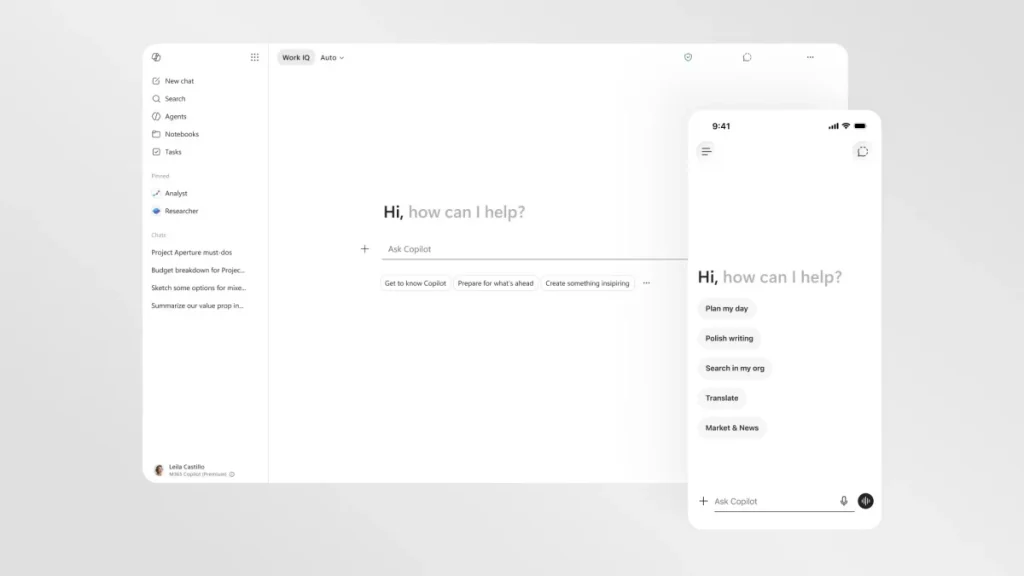
The Strategic Visual Re-alignment
Microsoft is currently recalibrating its artificial intelligence trajectory within the Windows ecosystem and productivity suites. Consequently, the enterprise recently debuted a comprehensive visual overhaul for Copilot inside Microsoft 365. This design significantly condenses color palettes and refines interface lines. Therefore, it successfully crafts a more rigorous, understated, and harmonious corporate appearance.
This adjustment primarily aims to amplify legibility across diverse applications. Furthermore, it signifies a deliberate corporate effort to mute Copilot’s individual persona. Thus, the system evolves into a highly precise productivity tool that exists without creating visual distraction.
The Minimalist Monochromatic Interface
The most immediate transformation involves a near-total removal of color from the core user workspace.
Streamlined Visual Dynamics
The default interaction interface transitions to an expansive, text-oriented monochromatic layout. However, the system retains native color icons exclusively when referencing auxiliary applications. Additionally, the engine permits the generation of vibrant multimedia content. Microsoft asserts that this refinement dramatically optimizes legibility and window responsiveness. Moreover, this philosophy allows the intelligent assistant to integrate seamlessly into active workflows without eclipsing primary tasks.
Unified Sidebar Topography
Previously, Copilot exhibited divergent positioning and interface logic across Word, PowerPoint, and Excel. Following this update, the assistant occupies a unified, fixed location within the right sidebar of all office software. Consequently, its operational paradigm mirrors the standalone Copilot application exactly. This absolute uniformity completely removes the cognitive friction historically associated with switching between distinct applications.
The Evolution of the Dynamic Prompt Surface
In the realm of software engineering and human-computer interaction, Microsoft introduced an intelligently adaptive prompt surface.
This text input module, localized at the base of the viewport, completely discards rigid formatting constraints. Instead, the boundary scales dynamically in real time according to user input. Simultaneously, this fluidity unlocks contextual feature sets.
For instance, the mechanism presents a standard dialogue box when processing elementary textual requests. Yet, the framework unfurls like a fan whenever an operator invokes advanced Copilot capabilities. These skills include document auditing, research compilation, or data visualization.
Subsequently, a contextual shortcut menu emerges to facilitate direct file selection from internal corporate repositories. Furthermore, this automation accurately guides the artificial intelligence to generate precise graphical charts. Additionally, inactive side panels auto-collapse immediately to preserve an unadulterated workspace.
The Corporate and Consumer Dual-Track Strategy
Microsoft strictly confines this professional, monochromatic presentation to commercial enterprise environments.
Conversely, the consumer-facing mobile Copilot application maintains its vibrant, multi-colored aesthetic. This lively design model debuted in late 2024. Thus, Microsoft actively enforces a distinct dual-track product strategy. Specifically, the enterprise satisfies corporate demands for efficiency while delivering an engaging experience to the public.
Support Our Threat Intelligence
Find our tech and OS security coverage helpful? Support our work today and unlock a 100% ad-free reading experience!
 Buy Me a Coffee
