 Do Son
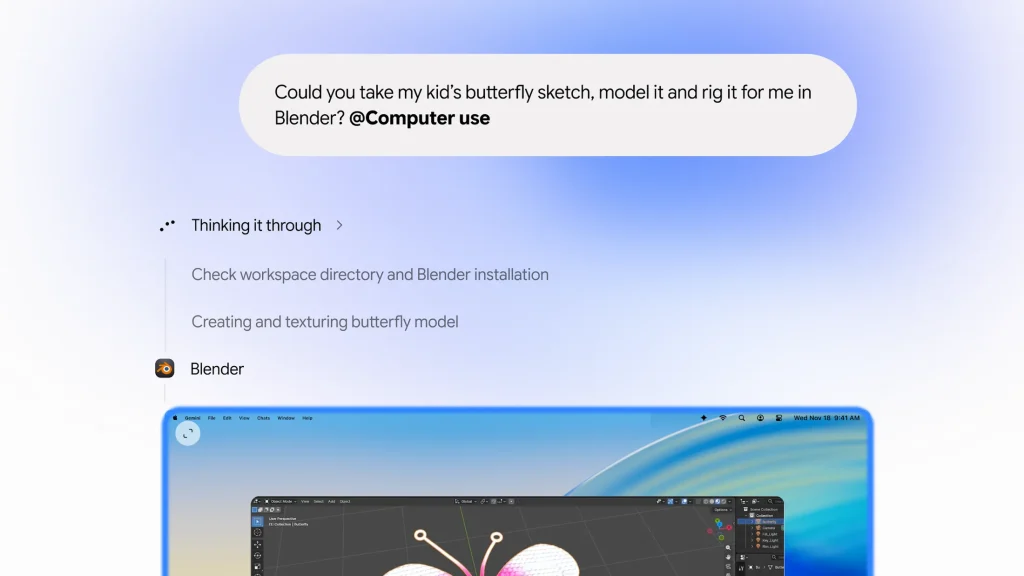
While Apple tightened macOS permissions this week and hinted that its own general-purpose agent may not arrive until late 2027, Google moved swiftly to bring full desktop automation to the Mac. Specifically, Gemini App Group Product Manager Michael Friedman announced that the native Mac Gemini app, originally launched in April, now includes Computer Use. Through visual screen comprehension, the assistant clicks, types, scrolls, and navigates menus on the user’s behalf. Consequently, Gemini Computer Use Mac completes tedious, multi-step workflows across local files, desktop applications, and web browsers automatically.
Isolated Background Windows Keep Your Cursor Free
Unlike early desktop automation scripts that hijacked the entire screen and froze the user’s cursor, Google engineered a far smoother experience. Specifically, Gemini executes tasks inside an isolated background window. While the agent fills out customs PDF forms or lists an entire folder of vintage clothing on eBay, you can continue attending meetings, writing code, or editing photos uninterrupted. Meanwhile, a live preview stream inside the chat window lets you monitor every action in real time.
Four Practical Workflows and New Desktop Connectors
Previously, the built-in Tasks feature (formerly Gemini Spark) relied primarily on cloud integrations with Gmail, Google Calendar, and basic file readers. Now, users simply type @Computer use in the chat bar and describe their goal in natural language. Immediately, Gemini controls legacy desktop software and complex web forms that lack public APIs.
In Google’s official announcement on Gemini Computer Use for Mac, the company highlighted four flagship cross-application workflows:
- Batch E-Commerce Listings: Place product photos into a local Mac folder, and Gemini inspects every image, researches market prices online, drafts descriptions, and creates ready-to-publish eBay draft listings.
- Local PDF Extraction and Form Filling: Gemini reads local customs documents, extracts package dimensions, weights, and recipient addresses, and populates multi-page freight quote forms automatically.
- Live Dashboard to Google Slides Decks: Assign Gemini to browse regional analytics dashboards, capture key charts and metrics, and compile a presentation-ready Google Slides deck.
- Creative Batch Edits and Blender 3D Rigging: Beyond batch color-grading photos, Gemini can convert a hand-drawn butterfly pencil sketch into a 3D model inside Blender and configure its internal animation rigging.
Alongside this update, Google expanded its Customize to Connectors menu. In addition to existing Git and Obsidian integrations, users now gain native connectors for Blender and Autodesk Fusion.
Four Security Guardrails, Apple Silicon Rules, and Pricing Tiers
Because granting an AI visual screen access and mouse control introduces significant security risks, Google enforced four strict architectural safeguards and eligibility thresholds:
- Isolated Window and Live Stream: All automated clicks and keystrokes stay confined within a dedicated background window, leaving your active focus untouched while streaming live visual feedback.
- Per-App Permissions and Mandatory Pauses: Users select exactly which apps and local folders Gemini can access, keeping banking and private messengers off-limits. Whenever a workflow encounters account logins, financial payments, or high-impact submissions, Gemini pauses automatically for human approval.
- 24-Hour Temporary File Deletion: Temporary file copies created during local edits automatically delete after 24 hours or when a new task begins, whichever comes first. Still, Google cautions that experimental agents can make mistakes, including unintended deletions or file sharing within authorized folders.
- Hardware and Subscription Requirements: At launch, native Computer Use requires a personal Google account in the United States set to English for users aged 18 and older, excluding Workspace accounts. Furthermore, users must subscribe to Google AI Plus, Pro, or Ultra and run macOS Sequoia 15.0 or later on an Apple Silicon M-series Mac.
Comparing Google Gemini Computer Use With Rival Desktop Agents
The table below contrasts Mac Gemini Computer Use against cloud-based Gemini Tasks and competing desktop agents from Anthropic and OpenAI.
| Comparison Metric | Mac Gemini Computer Use | Gemini Tasks (Formerly Spark) | Competing Desktop Agents (Claude Desktop / OpenAI) |
|---|---|---|---|
| Core Execution Environment | Isolated local background window on Mac (does not hijack main screen or mouse cursor) | Google Cloud background execution (recently upgraded to Gemini 4 Hydrogen) | Local desktop control, background computer-use mode, or dedicated cloud VMs (such as OpenAI Dots) |
| Primary Strengths | GUI automation for legacy apps without APIs (customs forms, batch eBay listings, Blender modeling) | Scheduled routines, daily Gmail and Calendar summaries, travel planning, and automated web research | Software engineering and coding (Codex / Claude Code), local file organization, and browser automation |
| Latest Software Connectors | Adds Blender and Autodesk Fusion alongside existing Git and Obsidian integrations | Native connections to Gmail, Docs, Sheets, Calendar, and Google ecosystem services | Broad support for Model Context Protocol (MCP) local and third-party developer toolchains |
| Security and Interrupt Controls | Per-app authorization, live chat screen preview, one-click pause, and mandatory human approval for logins or payments | Ephemeral cloud environment isolation; presents change lists for approval before external sends or shared file edits | Scoped project folder restrictions and tiered confirmation prompts for high-risk actions |
| Availability and Pricing | Apple Silicon Mac (macOS 15+), US English personal accounts, requires AI Plus, Pro, or Ultra plan | Recently opened to free users across 6 countries (US, Japan, South Korea, India, Canada, Australia) | Typically tied to paid Pro or Max subscriptions ranging from $20 to $200 per month |
Support Our Threat Intelligence
Find our tech and OS security coverage helpful? Support our work today and unlock a 100% ad-free reading experience!
 Buy Me a Coffee
