Google Ads Malware Targets macOS Developers With Fake Codex, Claude Code, and Homebrew Tools
 Do Son
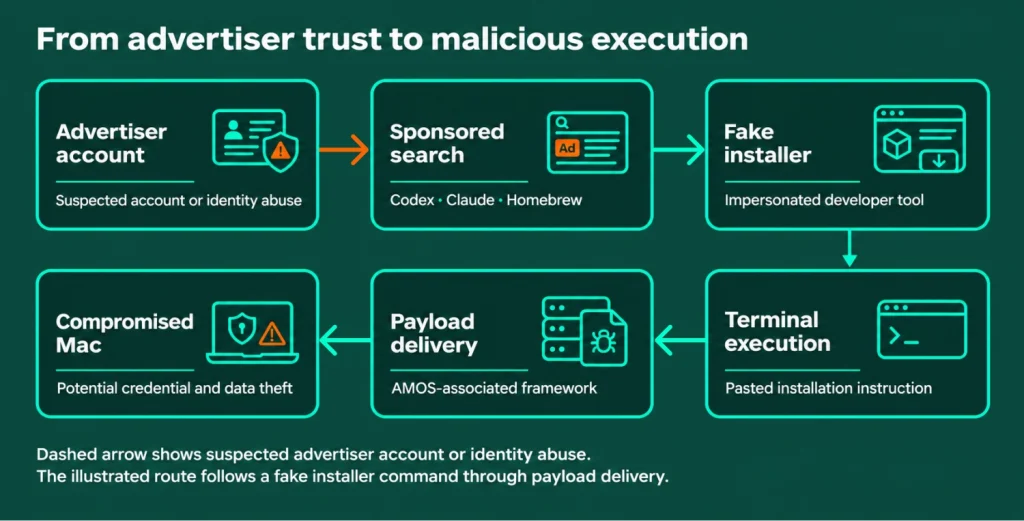
Illustrated command-based route from a sponsored search result through a fake developer-tool installer to payload delivery. | Image: Cato Networks
At a Glance
| Malware Family | Atomic macOS Stealer (AMOS)-associated delivery framework, environment-bound JXA loaders, and a trojanized arm64 macOS app named DayNote |
| Threat Actor | Unattributed (confirmed shared infrastructure linking multiple Claude and Codex lures; suspected abuse of compromised Google Ads accounts) |
| Target / Victims | macOS software developers and technical users searching for Codex, Claude Code, and Homebrew installers (exact victim count undisclosed) |
| Delivery Vector | Sponsored Google search ads using unrelated business identities, traffic cloaking, ClickFix Terminal lures, and fake disk images |
| Key Capabilities | AES-128-CTR encrypted shell loaders, host-profiled JXA decryption, Finder app masquerading, and macOS credential and data theft |
TL;DR
On November 19, 2026, Cato Networks exposed a Google Ads malware campaign targeting macOS developers searching for Codex, Claude Code, and Homebrew. Threat actors placed sponsored search ads under unrelated business identities to route users to fake installation pages and ClickFix Terminal commands. Furthermore, this macOS Google Ads malware reuses shared downstream infrastructure tied to Atomic macOS Stealer (AMOS) delivery alongside separate JavaScript for Automation (JXA) and disk-image chains.
Delivery and Attribution
Researchers Dr. Guy Waizel and Jakub Osmani investigated sponsored Google search results that promoted fake installers for popular developer utilities. Notably, the malicious ads appeared under verified advertiser profiles belonging to real, unrelated businesses. In one captured case, a health and nutrition company’s advertiser profile displayed a malicious Codex ad that still contained fragments of health-product text.
Because these mismatches point to hijacked advertising accounts, the legitimate businesses may also be victims. Independent reporting from Malwarebytes previously showed how attackers phish advertiser logins to launch malicious campaigns. Additionally, the redirect chains used traffic cloaking. As a result, this showed fake installation lures to some visitors and benign decoy pages – such as a fake TALLY app – to others.
Confirmed Versus Suspected Attribution
Confirmed technical evidence links several Codex and Claude lures through reused downstream domains and identical encrypted loader designs. However, confirmed attribution does not name a single threat actor or prove that one group operates every chain. Instead, suspected attribution connects the advertiser mismatches to compromised Google Ads accounts or identity misuse. Furthermore, this links the core Claude and Codex shell loaders to an AMOS-associated delivery system previously tracked by SANS Internet Storm Center. Researchers did not publish a total victim count. However, earlier Hunt.io tracking mapped at least 85 phishing domains tied to AMOS and Odyssey delivery.
Infection Chain
Across the primary Claude and Codex lures, the macOS Google Ads malware relies on ClickFix-style social engineering. Visitors searching for a Mac download land on a spoofed page that presents installation as a single copy-and-paste Terminal command. Because developers routinely install command-line tools this way, the workflow appears normal.
When a user pastes the instruction into Terminal, the command first prints a genuine Apple App Store URL to look trustworthy. Next, it decodes a hidden Base64 string to fetch and run a remote shell script in zsh. That script disguises its logic as cache maintenance, derives an AES key, decrypts an AES-128-CTR container, decompresses it with gunzip, and runs the recovered shell code. Afterward, the loader downloads a native binary into a temporary helper path. Then it strips macOS quarantine attributes and executes it.
Separate JXA and Disk-Image Chains
Cato Networks also documented two distinct macOS delivery paths that did not share domains with the main cluster. First, a separate Claude impersonation site served a ClickFix command that retrieved an environment-bound JavaScript for Automation (JXA) loader. That script profiled the host to derive a decryption key. Next, it downloaded a native Mach-O payload, built a counterfeit Finder application in the user’s Application Support folder, and displayed a fake error message.
Second, Homebrew lookalike sites mixed genuine installer references with hidden downloads. These sites also distributed a malicious arm64 macOS disk image containing an app named DayNote. When launched, DayNote pulled update instructions from a GitHub repository via jsDelivr. It then decoded a Base64 URL and decrypted an AES-128-CTR shell stage to fetch its final payload. According to the Cato Networks research report, “Our findings do not demonstrate a compromise of Homebrew itself.”
Command-and-Control and Data-Exfiltration Behaviour
During execution, the decoded Claude shell loader fires a background HTTP POST telemetry beacon carrying user and build headers to a reused metrics endpoint. Importantly, the script does not wait for that beacon to finish before fetching and launching the main payload. This separation matches AMOS infection chains documented by SANS. In those chains, operators track pasted commands independently from final stealer exfiltration. Once active, AMOS-associated payloads typically harvest macOS Keychain passwords, browser cookies, cryptocurrency wallets, and local developer files. Meanwhile, Cloudflare, GitHub, and jsDelivr restricted or removed several reported abuse resources by November 11, 2026.
Defense and Detection Guidance
As the researchers concluded, “A familiar advertiser identity or software brand does not authenticate the command a user is asked to run.” Developers should avoid clicking sponsored search results when downloading coding tools and instead bookmark official project websites. Teams should also inspect any pasted Terminal command for Base64 decoding, hidden remote fetches, or commands that strip macOS extended attributes.
Security teams can detect this Google Ads malware by monitoring macOS endpoints for unexpected zsh executions spawned from Terminal that write binaries to temporary helper paths. They can also watch for attempts to create user-writable Finder applications inside Application Support. Finally, organizations should enforce DNS filtering to block newly registered lookalike domains. In addition, businesses running Google Ads should audit their accounts for unauthorized campaigns or unknown login activity.
Support Our Threat Intelligence
Find our threat intelligence and malware analysis helpful? Support our work today and unlock a 100% ad-free reading experience!
 Buy Me a Coffee
