NIK C2 Framework Integrates OpenAI API to Analyze Stolen Data in Live Attacks
 Do Son
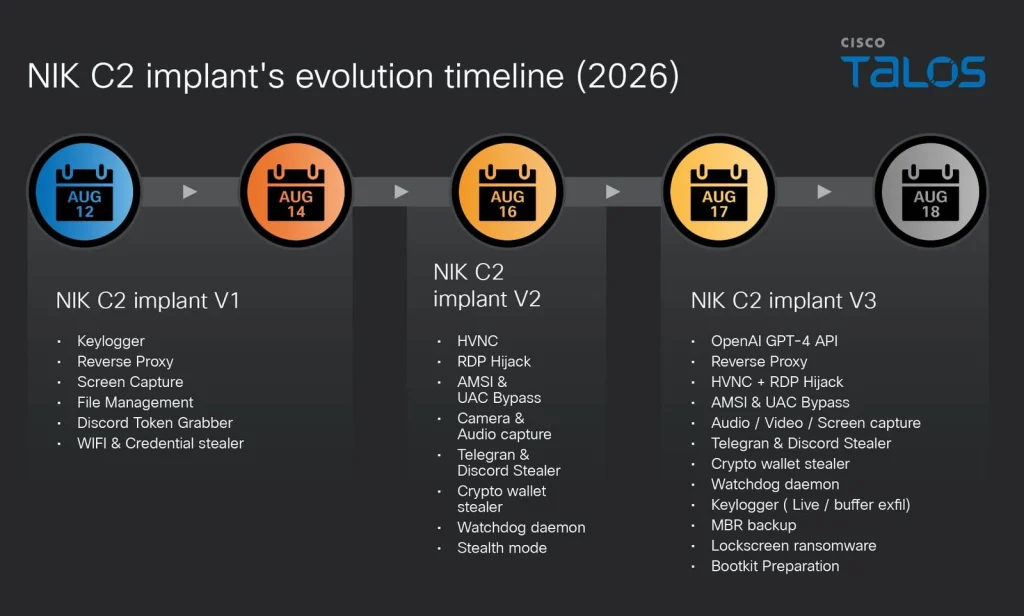
NIK C2 implant evolution timeline | Image: Cisco Talos
At a Glance
| Malware Family | NIK C2 framework (Go-based 64-bit Windows implant, OpenAI API client, and screen-locking ransomware) |
| Threat Actor | Unattributed operator group (internal project labeled nik_panel; intent unconfirmed) |
| Target / Victims | Windows endpoints holding cryptocurrency wallets, browser logins, and OpenAI developer keys (active server observed in the wild) |
| Delivery Vector | Initial delivery vector unconfirmed; executable compiled with Go 1.23.4 and cross-compiled from a Linux environment |
| Key Capabilities | OpenAI Chat Completions API abuse, dual-channel C2 (WebSocket and HTTP), screen-locking ransomware, MBR raw disk backup, critical process BSOD defense |
TL;DR
In October 2026, Cisco Talos discovered an active threat framework that integrates commercial artificial intelligence directly into compromised host sessions. Known as the NIK C2 framework, the platform uses a 64-bit Windows implant to harvest sensitive credentials, stream keystrokes, and trigger screen-locking ransomware. Furthermore, the Windows NIK C2 framework routes attacker prompts through OpenAI APIs to analyze stolen victim data in real time.
Delivery and Attribution
Researchers identified the NIK C2 framework active on live server infrastructure in late October 2026. The command server ran on a public IP address and resolved the domain total-sitevv.lol. An inspection of the server TLS certificate revealed a common name set to nik-panel, matching internal build strings. Within the implant binary, analysts uncovered an internal build path showing that the developer compiled the Go code on Linux. The compilation used Go version 1.23.4, setting the earliest build creation date to late 2024. In addition, all recovered samples carried zeroed PE timestamps to hinder timeline analysis. They also displayed simulated file creation dates from November 1979.
Between August 12 and August 18, 2026, the tool evolved rapidly across three distinct versions. Version 1 included credential theft and a reverse proxy. Version 2 introduced hidden desktop control and evasion modules. Finally, version 3 integrated OpenAI models and desktop ransomware. As the Cisco Talos research report observes, “The pace of capability addition across the three versions indicates a technically proficient team with prior malware operations experience is actively expanding NIK C2 towards a full-service adversarial framework.”
Confirmed attribution to a specific country or known threat actor remains unverified. However, confirmed artifacts establish that a single organized team maintains the nik_panel project. Suspected attribution points to financially motivated cybercriminals seeking quick monetary gain. Specifically, the operators prioritize cryptocurrency wallets, API quota theft, and screen-locking extortion. While broad victim telemetry remains limited, Broadcom Carbon Black confirmed that the infrastructure operated actively in the wild rather than as a research proof of concept.
Infection Chain and System Evasion
Once deployed on a Windows system, the Windows NIK C2 framework implant checks its launch flags. An argument called watchdog starts a background supervisor that relaunches the primary agent if someone terminates it. Without flags, the binary defaults to primary agent mode and creates a named mutex to block duplicate instances. Immediately after launch, the implant hides its console window using the Windows ShowWindow function. It then renames its process image to csrss.exe or svchost.exe inside the temporary directory.
Next, the malware modifies Windows registry entries to disable Recent Documents tracking. To prevent termination from Task Manager, it calls the native API NtSetInformationProcess with the critical process flag. If a defender terminates the process, the operating system crashes with a Blue Screen of Death. The implant also runs silent debugger checks, terminating cleanly without error logs if it spots analysis tools. When granted user privileges, the binary bypasses User Account Control through the fodhelper.exe registry hijack.
Furthermore, the implant patches the Antimalware Scan Interface in process memory. It loads the automation library and overwrites the AmsiInitFailed field with a six-byte assembly sequence. Consequently, the operating system reports an initialization failure, which disables script scanning for the rest of the PowerShell session. The implant then copies itself to the user application directory and establishes autostart persistence through the Windows Run registry key.
Command-and-Control and Data-Exfiltration Behaviour
Communication relies on a dual-channel architecture. The primary channel connects over TLS-secured WebSockets on port 443 with strict certificate pinning. This pinning stops enterprise interception proxies from inspecting outbound traffic. Simultaneously, an HTTP polling loop posts system snapshots to an update endpoint every 250 milliseconds. Both channels use AES-256-GCM encryption with keys derived from a hardcoded 32-byte seed.
The operator panel directs over 52 commands across parallel worker threads. The implant extracts Wi-Fi passwords via wireless profile queries and loots Discord tokens from database files. It also targets desktop cryptocurrency wallets such as Exodus, Electrum, and Bitcoin Core, alongside browser extension wallets like MetaMask and Phantom. Additionally, regex searches scan drives for seed phrases and private keys. A background keylogger polls virtual key codes, streaming keystrokes live over WebSockets while buffering up to 10,000 entries in memory.
On-Device Artificial Intelligence Integration
The most unusual feature within the NIK C2 framework is its embedded OpenAI client. Through an internal generation command, operators send prompts directly to the OpenAI Chat Completions API from the victim host. If the attacker does not supply an API key, the implant reads the victim local environment variables for an existing key. As Cisco Talos warned, “If the victim has configured an OpenAI account on their machine, that account’s API key will be used to fund the actor’s AI inference.” This tactic forces the victim to pay API fees while shielding the attacker identity in access logs. The query includes a hardcoded 68-byte system prompt that sets the model role before returning encrypted AI output to the operator.
Screen-Locking Ransomware and Bootkit Preparation
Instead of encrypting files, the implant deploys an HTML-based screen locker. First, it copies the Master Boot Record from the physical drive to a backup file in the temporary folder. Next, it writes a custom HTML page containing Bitcoin and USDT payment addresses. A companion batch script launches the page via mshta.exe inside a five-second loop. The implant adds an autostart registry key so the screen lock reloads after every reboot. A separate module checks for UEFI firmware and Secure Boot before staging a placeholder file for future bootkit deployment.
Defense and Detection Guidance
Security teams must monitor network boundaries for certificate-pinned WebSocket connections on port 443 connecting to unclassified IP addresses. Defenders should also inspect Windows endpoints for processes that modify the critical process flag on non-system binaries. Administrators can audit Windows autostart registry keys for entries that launch mshta.exe or batch scripts from temporary directories.
Furthermore, organizations should watch for unusual outbound traffic to the OpenAI API originating from standard employee workstations. Security teams should store cloud and AI API keys in dedicated credential managers rather than operating system environment variables. Removing API tokens from developer environment profiles stops attackers from funding AI queries with company accounts. Finally, administrators should restrict PowerShell script execution and monitor the fodhelper registry path to catch privilege escalation attempts before implants establish persistence.
Support Our Threat Intelligence
Find our threat intelligence and malware analysis helpful? Support our work today and unlock a 100% ad-free reading experience!
 Buy Me a Coffee
