 Do Son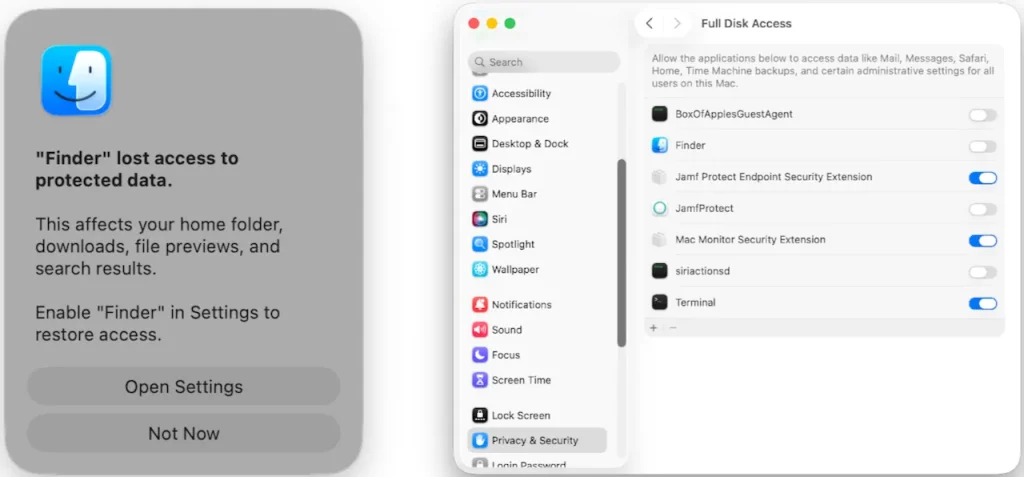
Image: Jamf Threat Labs
| Malware family | PamStealer (Rust-based macOS infostealer) |
| Threat actor | Not attributed by Jamf |
| Targets | Apple Silicon Mac users; victim count not disclosed |
| Delivery vector | Fake Maccy clipboard app on maccyapp[.]com, via a disk image and compiled AppleScript |
| Key capabilities | PAM password validation, browser and keychain theft, crypto wallet and clipboard capture, persistence |
| Source | Jamf Threat Labs |
TL;DR
Jamf Threat Labs found a new macOS infostealer called PamStealer. It hides inside a fake Maccy clipboard app and runs a Rust payload. Before it steals anything, it confirms your login password through Apple’s PAM framework.
How PamStealer spreads
The PamStealer macOS malware arrives as a fake Maccy app. Attackers host it on maccyapp[.]com, a lookalike of the real maccy.app site. The download is a disk image that holds a compiled AppleScript file, Maccy.scpt.
When opened, macOS shows the script in Script Editor. Branded text then tells the victim to press Cmd+R. That single click runs the hidden code. In response, the real Maccy developer has warned users about these fake sites.
Inside the two-stage chain
Stage one: the AppleScript dropper
PamStealer works in two stages. First, the AppleScript acts as a dropper. It runs a JavaScript for Automation downloader that fetches the payload through native macOS APIs. Because it skips tools like curl or zsh, it leaves fewer traces.
The dropper also checks the host before it continues. It only unlocks on Apple Silicon, and it skips systems in several ex-Soviet regions. If any check fails, the script quietly exits.
Stage two: the Rust stealer
Next comes a Rust-based Mach-O stealer that poses as Finder. Rust stays rare on macOS, so it slows down analysis. Most of its strings decode only at runtime, which hides its true behavior.
What it steals and how it phones home
Once running, the Rust infostealer casts a wide net. It reads browser databases, keychain data, and crypto wallet files. It also grabs clipboard contents by calling pbpaste over and over.
The malware’s name points to its password trick. It shows a fake prompt that reads like a real macOS request, then verifies the entry through PAM. Jamf says this keeps “only a verified password, and one fewer process chain” to spot.
For exfiltration, PamStealer sends encrypted data to its command-and-control server. It uses ChaCha20-Poly1305 with keys built at runtime. A network cache on disk records the contact, yet the contents stay encrypted.
After it captures a valid password, the Rust infostealer shows a fake “damaged app” alert. This decoy nudges the victim to trash the lure and assume the download simply broke. By then, the theft is already done.
The malware also digs in for the long haul. It registers its fake Finder as a login item through two methods, one modern and one legacy. Later, it may show a counterfeit alert that asks for Full Disk Access, sometimes up to forty minutes after launch.
Attribution and scope
Jamf has not tied PamStealer to a named group, so attribution stays unconfirmed. The report also gives no victim count. Still, the malware targets Apple Silicon Macs and reaches Ethereum RPC endpoints, which hints at crypto-focused goals.
How to detect and defend
Watch for compiled .scpt files inside disk images from outside the App Store. Also flag Script Editor when it makes network requests or signs bundles in Application Support. A process that poses as Finder and repeatedly spawns pbpaste is another strong signal.
Treat surprise password prompts with care, and avoid granting Full Disk Access to unexpected apps. For the full technical detail, read the Jamf Threat Labs analysis of PamStealer. It documents each stage and lists indicators that defenders can adapt.
Support Our Threat Intelligence
Find our threat intelligence and malware analysis helpful? Support our work today and unlock a 100% ad-free reading experience!
 Buy Me a Coffee
