The Fake Security Checkup: How a Rogue ‘Google’ App Hijacks Your Digital Life
 Do Son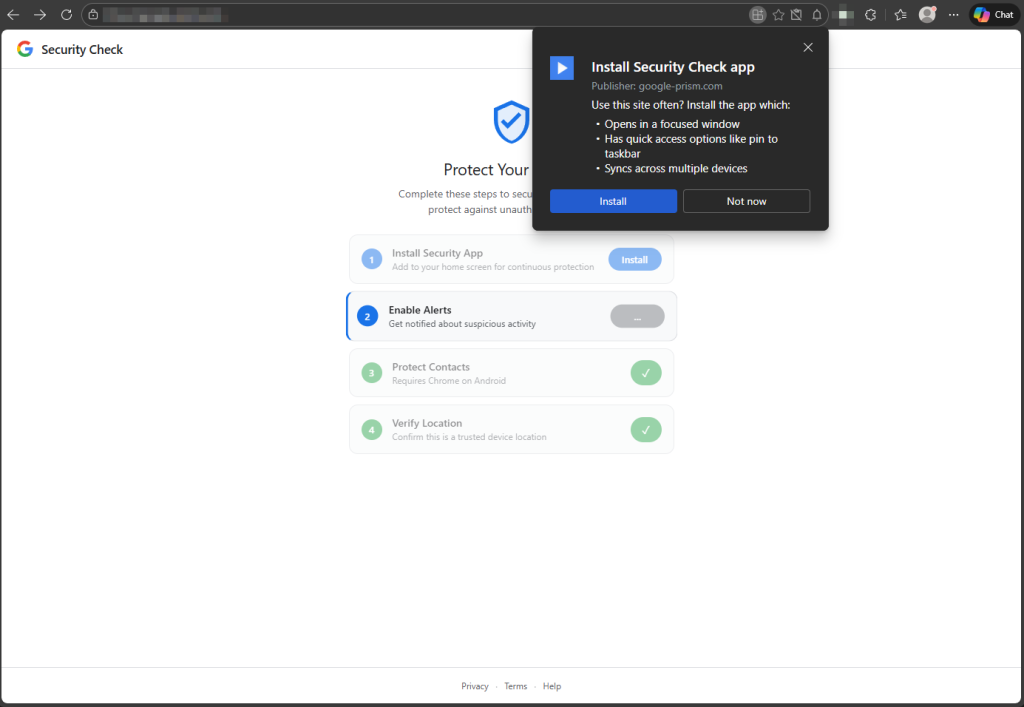
The user is prompted to “install” the security tool as a PWA | Image: Malwarebytes Labs
Imagine a pop-up warning you that your Google Account needs a security checkup. It looks flawless. It walks you through a few simple steps to secure your device. You feel safer. But behind the scenes, you’ve just handed over the keys to your entire digital life.
According to a new report from Malwarebytes Labs, cybercriminals are using this exact trick to turn web browsers into incredibly powerful spying tools.
As the researchers describe it: “A website styled to resemble a Google Account security page is distributing what may be one of the most fully featured browser-based surveillance toolkits we have observed in the wild.”
The most frightening part of this new threat isn’t a complex line of code or a highly sophisticated hack. The researchers state plainly: “It does not rely on an exploit or browser bug. It relies on you believing you are responding to Google.”
The trap is sprung from a malicious domain (google-prism[.]com). When a user visits, they are prompted to “install” the security tool. What they are actually installing is a Progressive Web App (PWA)—essentially a website that acts like a standalone app on your phone’s home screen. Once installed, the browser’s address bar disappears, making the fake site look exactly like a native Google application.
The site then guides the victim through a four-step “security check,” which is actually a carefully disguised robbery:
- Enable Alerts: It asks for push notification permissions, giving the attacker a permanent way to communicate with your device.
- Protect Contacts: It asks you to select your contacts to “secure” them. In reality, it sends your entire contact list directly to the hackers.
- Verify Location: It asks to verify your “trusted location,” immediately stealing your exact GPS coordinates, speed, and heading.
- Clipboard Access: It quietly monitors your clipboard, waiting for you to copy one-time passwords or cryptocurrency wallet addresses.
You might think that simply closing the browser tab would stop the attack. Unfortunately, this malware is built to survive.
When you grant those initial permissions, a piece of code called a “service worker” burrows into the background. Even if you close the app, this background helper stays awake. It can queue up stolen data when your phone is offline and upload it the second you connect to Wi-Fi.
Worse yet, it acts as a “digital bridge” (a WebSocket relay). This allows the hacker to route their own web traffic through your phone. If you are connected to your company’s Wi-Fi, the attacker can use your device to secretly scan your employer’s internal network.
For victims who follow every prompt, the site eventually offers a “critical security update.” This is actually a malicious Android app (an APK) disguised as a “System Service.”
If installed, this app requests 33 different permissions. It installs a custom keyboard to record every single thing you type (a keylogger), uses accessibility features to read your screen, and can even intercept the two-factor authentication (2FA) codes sent to your phone via SMS.
As the report concludes: “The social engineering is central to how the activity works.” The attackers are relying on your natural desire to keep your accounts secure.
To stay safe, remember this rule: Google will never conduct security checkups through unsolicited, random pop-up pages that ask you to install software. If you receive a security alert, do not click the links. Instead, open a fresh browser window and manually type myaccount.google.com to check your actual security status.
Support Our Threat Intelligence
Find our threat intelligence and malware analysis helpful? Support our work today and unlock a 100% ad-free reading experience!
 Buy Me a Coffee
