Fake WatchGuard VPN Site Steals Credentials Before Delivering Genuine Installer
 Do Son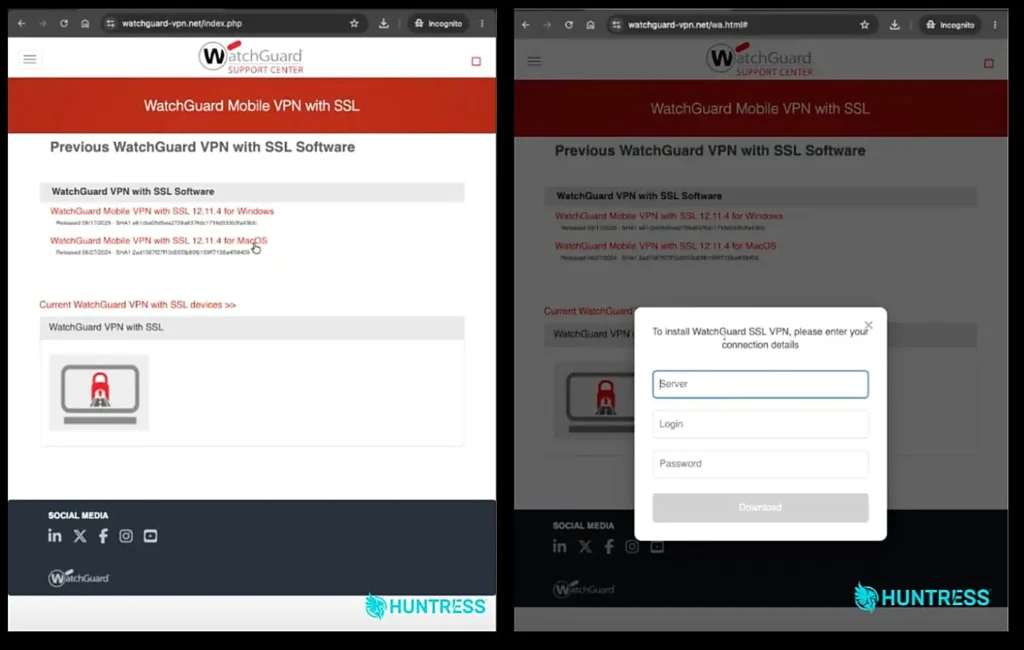
argets are taken to a download page (left) and when they click "Download" the credential prompt is shown (right) | Image: Huntress
At a Glance
| Malware / Campaign Family | Browser-based WatchGuard VPN phishing kit (popup.js credential harvester; no endpoint malware) |
| Threat Actor | Suspected overlap with Storm-2561 (financially motivated group tracked by Microsoft; current iteration unconfirmed) |
| Target / Victims | IT administrators and Managed Service Providers (1 confirmed MSP incident analyzed by Huntress in October 2026) |
| Delivery Vector | Search engine optimization (SEO) poisoning via Bing organic search results |
| Key Capabilities | In-browser server and login theft, double-entry credential harvesting, official vendor binary delivery |
| Sources | Huntress Security Operations Center, WatchGuard Secplicity, and Microsoft Threat Intelligence |
TL;DR
Huntress researchers uncovered a WatchGuard VPN phishing campaign that steals network credentials directly inside the web browser. Instead of dropping malware, the WatchGuard VPN phishing site harvests the target server address, username, and password twice. Finally, the page delivers the genuine, digitally signed WatchGuard installer from the vendor’s official content delivery network.
Delivery and Attribution
On October 7, 2026, an administrator at a managed service provider searched Bing for a WatchGuard client download. The user made a small typo in the search query. Eight seconds later, the administrator clicked an organic search result leading to a lookalike WatchGuard domain. Redirect parameters confirmed that the attackers used search engine optimization poisoning rather than paid search ads. Furthermore, the fake page included a product questions section to boost its search engine ranking. Ironically, the bottom of the webpage displayed a tiny disclaimer claiming to be an independent fan site.
This campaign builds upon earlier operations reported by multiple security teams. In January 2026, WatchGuard Secplicity documented lookalike domains targeting WatchGuard, Fortinet, F5, SonicWall, and Sophos users. At that time, Bing Copilot even recommended the spoofed WatchGuard domain to users. However, the site lacked backend code in January. Two months later, Microsoft Threat Intelligence linked a related domain to a financially motivated group named Storm-2561. The problematic domain was re-registered in August 2026 on Dutch hosting infrastructure. While the domain name matches earlier reports, confirmed attribution to Storm-2561 remains unproven for this October renewal. Therefore, links to Storm-2561 represent suspected attribution based on shared infrastructure patterns.
Infection Chain and Credential Capture
Earlier attacks distributed fake installers that sideloaded malicious libraries onto victim machines. In contrast, the Huntress research report shows that this new WatchGuard VPN phishing workflow removes endpoint malware entirely. When a visitor clicks any download link on the fake support page, the browser loads an unobfuscated JavaScript file. This script displays a modal prompt asking for three specific fields: Server, Login, and Password.
Double Credential Harvesting
Because the real Mobile VPN with SSL client asks for these exact details, the prompt appears normal to administrators. Moreover, the server field gives attackers the exact network address needed for remote access. When the victim submits the form, the script rejects the first entry on purpose. It clears the boxes and shows a red error message claiming the user entered incorrect data. Consequently, users type their password more carefully or try an alternative corporate password on the second attempt. As Huntress noted, “Meanwhile, unbeknownst to the victim, the threat actor now has access to their credentials, giving them access to victims’ networks.”
Command-and-Control and Exfiltration Behavior
The JavaScript code wraps the stolen inputs into a JSON object. Next, it sends the data via a background web request to a separate collection server registered in September 2026. The payload includes a tag marking whether the data came from the first or second submission. Additionally, the script hides network errors inside a silent code block so victims notice nothing unusual if the server goes offline.
Official Installer Delivery
After the second submission, the prompt turns green and starts the file download. The script fetches the real Mobile VPN with SSL installer directly from WatchGuard’s official content delivery network. Huntress verified the binary signature and confirmed the file was unmodified. As the researchers explained, “First of all, there’s no trojanized installer or malicious DLL for security defenses to flag.” Because no malicious binary touches the disk, endpoint detection tools stay quiet. In fact, only seven VirusTotal vendors flagged the lure domain on October 8. By October 13, the primary WatchGuard VPN phishing site went offline following vendor notification.
Defense and Detection Guidance
In the investigated incident, Huntress Managed Defender alerted responders 21 seconds after the browser loaded the malicious page. Browser logs showed the target closed the page before completing the second prompt. Even so, anyone who enters data on a WatchGuard VPN phishing site must reset their passwords immediately. Administrators should also treat the entered VPN server address as compromised.
Defenders cannot rely solely on antivirus software to catch browser-based credential theft. Therefore, organizations must enforce multi-factor authentication across all remote access gateways. Security teams should also monitor VPN logs for login attempts coming from commercial hosting providers or unfamiliar countries. Finally, IT departments should block the associated lookalike domains and bookmark official vendor download portals inside internal documentation.
Support Our Threat Intelligence
Find our threat intelligence and malware analysis helpful? Support our work today and unlock a 100% ad-free reading experience!
 Buy Me a Coffee
