 Do Son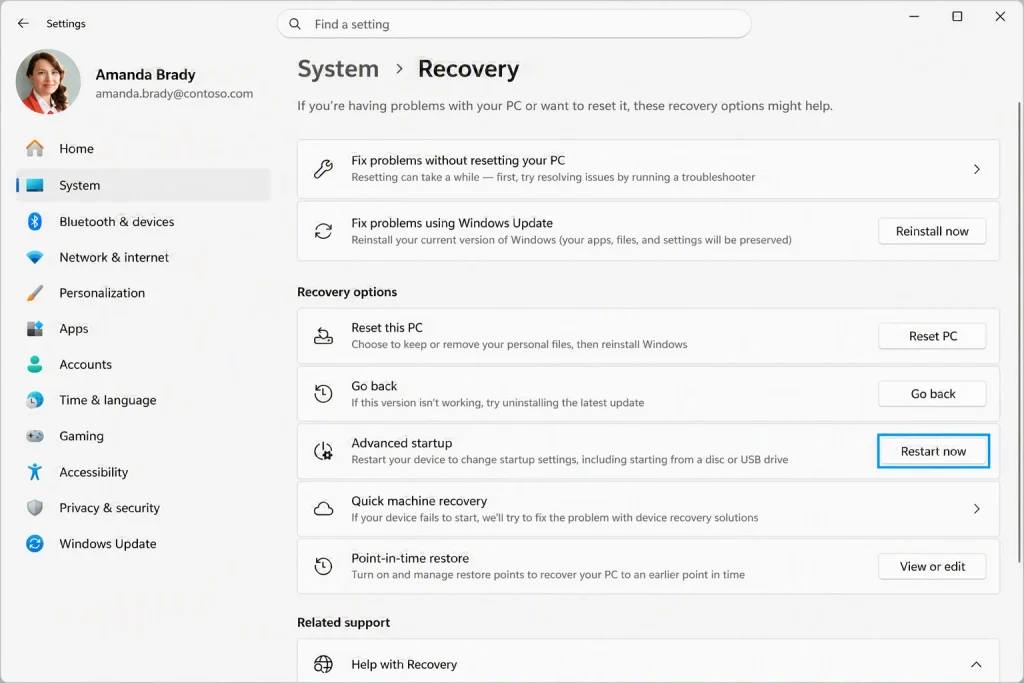
Historically, when a Windows PC suffered catastrophic system corruption or failed to boot entirely, users faced a daunting ordeal. They typically had to scavenge for a USB flash drive. They also needed to locate a functional computer to forge an installation medium. Users might also need to rely heavily upon a manufacturer-preloaded local recovery partition. However, within the latest Windows 11 preview build 26220.9343, Microsoft has officially introduced a native recovery feature designated “Cloud Rebuild.” This innovation dictates that even if the operating system crashes completely, provided the device maintains network connectivity, users can directly download a pristine image file from the Microsoft cloud. Additionally, they can retrieve essential drivers. This allows them to seamlessly reset the computer to its original factory state.
Direct Networking from the WinRE Environment
Engineers have deeply integrated the gateway to “Cloud Rebuild” within the Windows Recovery Environment. When a computer encounters consecutive boot failures, the system will automatically trigger entry into this specialized environment. Alternatively, users can manually access it under normal conditions. To do so, they should navigate to Settings, select System, then Recovery, and click “Restart now” under Advanced startup.
Beneath the “Troubleshoot” and “Reset this PC” menus within the recovery environment, the newly incorporated “Cloud Rebuild” option prominently appears. In stark contrast to legacy reset mechanisms that relied upon potentially compromised local partitions, this modern feature operates through a highly streamlined workflow.
- Cloud Retrieval of Pristine Images and Drivers: Once the device establishes an Ethernet or Wi-Fi connection, the system directly contacts Windows Update servers. It downloads the latest target Windows system image and the corresponding hardware drivers. This process entirely circumvents any reliance on the file integrity of the already corrupted local system and completely eliminates the need for external USB storage devices.
- Customizable Version Selection: The interface empowers users to directly confirm and select their desired Windows edition, specific build version number, and system language before initiating the installation.
- Automatic Wi-Fi Profile Inheritance: To alleviate the historical tedium of networking within the offline WinRE environment, Microsoft implemented a mechanism to retain Windows Wi-Fi profiles in this specific build. The system will automatically import previously saved wireless network credentials, sparing users the profound annoyance of manually re-entering lengthy passwords within a text terminal or rudimentary interface.
WinUI Modernization and Enhanced Mobile Backup
Beyond the core disaster recovery capabilities of Cloud Rebuild, the Windows 11 preview build 26220.9343 release notes detail several meticulous system refinements.
- AutoPlay Interface Revamp: The antiquated AutoPlay interface has received a comprehensive overhaul utilizing the modern Microsoft WinUI framework. It now fully supports seamless transitions between light and dark modes while optimizing text scaling display effects specifically for high-resolution monitors.
- File Explorer and Personalization Tweaks: The File Explorer address bar now natively supports double backslash and quotation mark inputs, significantly enhancing the convenience of navigating web and network neighborhood paths. Furthermore, the desktop background engine now supports DIB format files, accompanied by subtle adjustments to the live preview experience within the personalization menu.
- Automated OneDrive Mobile Backup: A new option within the system settings allows users to directly schedule the automatic backup of photos and videos stored on connected mobile devices directly to their OneDrive cloud storage space.
Bridging the Recovery Gap with macOS
Users entrenched within the Apple ecosystem are undoubtedly familiar with the venerable “macOS Recovery” feature. For over a decade, Mac machines have possessed the capability to connect to Wi-Fi during the boot sequence via specific keyboard combinations. This allows them to directly download and reinstall the entire operating system directly from Apple servers.
Conversely, within the Windows domain, reinstalling the operating system has perpetually involved the relatively cumbersome technical hurdles of creating bootable flash drives. Users also needed to hunt for ISO files and manually extract drivers. By implementing “Cloud Rebuild” within WinRE, Microsoft has essentially finalized the fundamental alignment of its core operating system with modern cloud infrastructure.
The paramount value of this feature resides in its ability to simultaneously package and retrieve both essential drivers and a pristine system image. Previously, standard Windows cloud resets often still relied upon specific drivers and configurations originally residing on the device. Consequently, any corruption of files on the storage drive frequently precipitated recovery failure. Furthermore, the proprietary recovery partitions constructed by major OEM laptop manufacturers are notoriously bloated with antiquated software and intrusive bundled applications.
By completely bypassing local physical partitions and delivering the latest verified version directly from the Microsoft cloud, Cloud Rebuild significantly reduces troubleshooting overhead for average users. For remote workers or small-to-medium studios lacking robust enterprise deployment tools like Intune or SCCM, it represents a disaster recovery safeguard. Moreover, it boasts virtually zero maintenance costs.
Support Our Threat Intelligence
Find our tech and OS security coverage helpful? Support our work today and unlock a 100% ad-free reading experience!
 Buy Me a Coffee
