 Do Son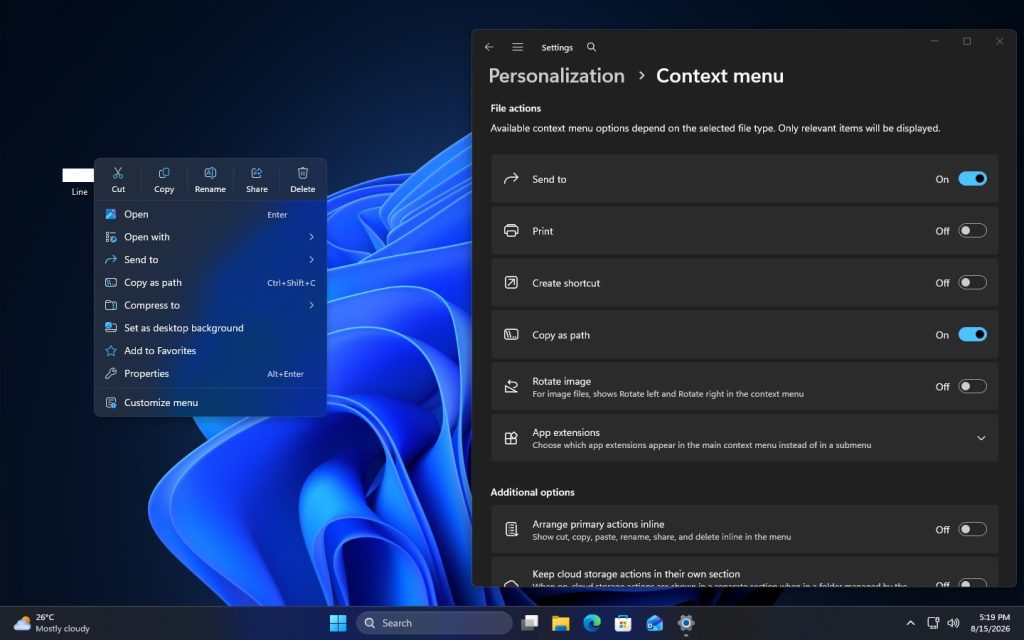
Microsoft is currently developing a customizable right-click context menu for Windows 11. Screenshots of the feature surfaced online, revealing that the new menu applies to both the desktop and File Explorer, directly addressing a long-standing complaint: right-click menus cluttered with excessive options that slow users down.
Based on the screenshots circulating so far, the applications currently eligible for collapsing or control are primarily Microsoft’s own – Windows Terminal, OneDrive, Notepad, Paint, and Photos among them. Third-party applications that wish to integrate with the new context menu framework will likely require additional work from their respective developers before appearing in the same interface.
Collapsing Menu Entries Through User Preferences
In the current test build – which has not yet been publicly released – a new “Customize menu” option has been added to the bottom of both the desktop and File Explorer context menus. Selecting it navigates to Settings, then Personalization, then Menu, then App Extensions. In this context, “app extensions” refers to the right-click menu items that individual applications inject into the system.
For applications that already support the new framework, users can manually disable their menu entries within the App Extensions panel. Once disabled, that application’s context menu entry no longer appears there. This reveals an important default behavior: Microsoft collapses app-injected context menu items by default, rather than displaying them directly in the right-click menu as before. What users are toggling off, specifically, is the corresponding entry within App Extensions.
OneDrive, notably, appears to retain the ability to display its menu independently. Since this capability has not yet gone live, it cannot currently be tested firsthand. Based on available evidence, Microsoft’s eventual design may allow users to assemble a fully customized menu – placing frequently used options in the primary menu, collapsing less common ones into a secondary submenu, and grouping any application that injects multiple extensions into its own dedicated submenu.
Key Menu Items Can Now Revert to Classic Style
Another significant change allows core actions – copy, paste, cut, rename, share, and delete – to be configured in classic style: displayed as standard list entries within the right-click menu, rather than as icon buttons arranged along the top or bottom of the menu in Windows 11’s current design.
The rationale behind this particular change remains somewhat unclear. The existing horizontal button row already includes text labels beneath each icon, so users can identify each action’s function without ambiguity. The classic-style option may be intended to accommodate users who have only recently upgraded from Windows 10 and are less accustomed to the redesigned layout. For those who have used Windows 11 for an extended period, the horizontal icon row is unlikely to pose any real difficulty.
These changes remain under active testing and have not yet been pushed to Windows 11 Insider Preview users. Given the current pace of development, however, customizable context menu functionality should begin rolling out to upcoming Windows 11 preview builds in the near future.
Support Our Threat Intelligence
Find our tech and OS security coverage helpful? Support our work today and unlock a 100% ad-free reading experience!
 Buy Me a Coffee
