 Do Son
Microsoft Threat Intelligence discovered a new cryptocurrency stealer affecting users since February 2026. This Windows crypto clipper malware steals financial assets and spreads rapidly. Security analysts emphasize the severe risks associated with this novel campaign.
- Malware Family: Win32/CryptoBandits.A
- Threat Actor: Unknown financially motivated groups
- Target: Windows cryptocurrency users
- Delivery Vector: Malicious shortcut files on USB drives
- Key Capabilities: Clipboard theft, address substitution, remote code execution
- Source: Microsoft Threat Intelligence
Executive Summary
This Windows crypto clipper malware uses infected USB drives to reach targets. Once inside, this Tor routed cryptocurrency stealer steals seed phrases and replaces wallet addresses. Furthermore, the malware acts as a backdoor to execute remote commands.
Malware Delivery Methods
Threat actors distribute this malware entirely through physical USB storage devices. These drives harbor malicious shortcut files ending in `.lnk`. Often, these shortcuts masquerade as legitimate PDF or Excel documents. Users plug in the compromised drive to view their files. Subsequently, they click a shortcut and unknowingly trigger a hidden executable. This initial step requires no internet connection to begin the attack. Thus, the delivery method bypasses standard network perimeter defenses quite easily.
The Infection Chain
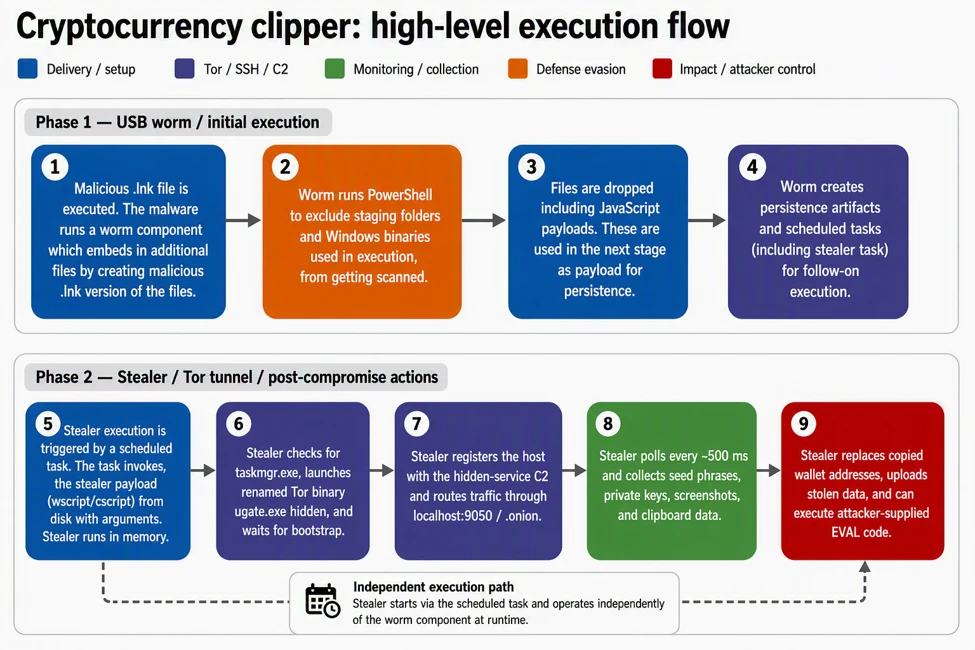
The infection begins immediately after the user executes the shortcut. First, the shortcut launches a specialized worm component on the host machine. This worm drops two highly protected JavaScript payloads into a public folder. Next, the malware establishes long-term persistence on the device. It creates scheduled tasks to run the stealer component frequently.
Additionally, the worm actively seeks to spread itself further. It monitors the system for new USB storage devices. When a user inserts a clean drive, the worm hides the existing files. Then, it creates new malicious shortcuts bearing the exact same names. Therefore, the malware propagates to other machines whenever that USB drive travels. This self-replicating behavior ensures a wide infection radius across connected organizations.
Data Exfiltration Behavior
This malware avoids traditional external command-and-control servers entirely. Instead, it deploys a bundled Tor client directly on the victim’s machine. The malware routes all traffic through a local proxy. Consequently, it hides its tracks from standard network monitors. According to the report, “Clipper malware relies on stealing clipboard data and parsing it for valuable assets.”
The stealer component frequently monitors the Windows clipboard for valuable data. It actively searches for 12-word or 24-word recovery seed phrases. Furthermore, it hunts for private keys tied to Ethereum and Bitcoin wallets. It captures these keys and uploads them directly to an anonymous Tor address.
Next, the Tor routed cryptocurrency stealer performs address substitution. It detects when a user copies a legitimate wallet address. Then, it swaps that address with an attacker-controlled destination. The malware precisely matches the first few characters of the original address. Thus, victims rarely notice the swap before authorizing a risky transaction.
Finally, the malware periodically captures screenshots of the victim’s desktop. It uploads these images to give attackers more context about wallet balances. The command server can also issue a specific remote command. This command allows the attacker to execute arbitrary scripts locally. As researchers noted, “The combination of Tor-routed C2, clipboard targeting, screenshot capture, and remote code execution gives attackers both immediate monetization paths and continued control over compromised devices.”
Defense and Detection Guidance
Organizations must adopt strict policies to block this threat. Standard static antivirus signatures often fail to stop the initial script execution. Therefore, defenders must rely heavily on behavioral monitoring techniques. Microsoft Threat Intelligence detailed these findings in a recent cybersecurity advisory.
Security teams should monitor their endpoints for suspicious script engine activity. Specifically, investigate instances where WScript or CScript launch unexpected child processes. Administrators should immediately disable AutoRun and AutoPlay for all removable media. Furthermore, organizations should use Group Policy to block shortcut execution from USB drives. Network defenders must also hunt for unusual local proxy activity to uncover active infections.
Support Our Threat Intelligence
Find our threat intelligence and malware analysis helpful? Support our work today and unlock a 100% ad-free reading experience!
 Buy Me a Coffee
