Workstation in Your Pocket: Claude Code Unveils “Remote Control” for Total Mobile Dev Autonomy
 Ddos
Ddos 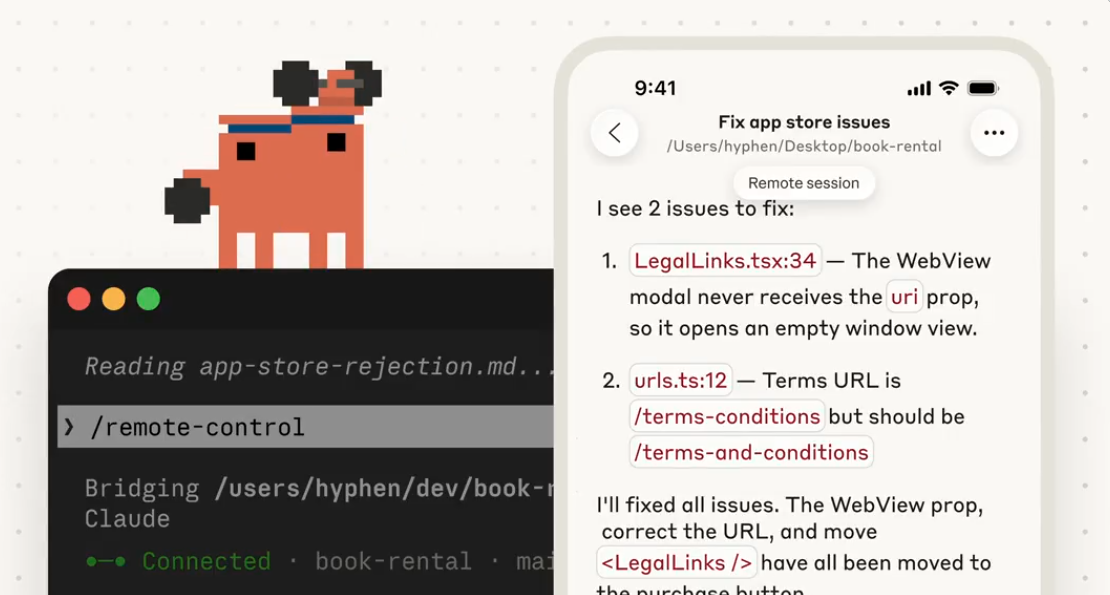
The AI-driven programming suite Claude Code has recently unveiled its sophisticated Remote Control capability, currently accessible as a research preview for Claude Pro and Claude Max subscribers. This innovation transmutes Claude Code into a seamless, cross-device AI development agent, arguably offering the most fluid transition from local workstations to mobile environments presently available to individual developers.
Diverging from the predecessor Claude Code on the Web, the foundational philosophy of Remote Control emphasizes absolute local computation. In this paradigm, the remote device serves exclusively as a portal, ensuring that all data remains sequestered within the local environment rather than being exfiltrated to the cloud. While Claude Code retains comprehensive authority over the local file system, terminal commands, MCP servers, and bespoke tools, the client—whether on a smartphone, tablet, or browser—merely facilitates input, output, and dialogue synchronization.
The architectural integrity of this feature relies upon a purely outbound connection model. Local processes utilize API registration combined with HTTPS polling and streaming, fortified by multiple layers of short-lived, scoped credentials and full TLS encryption. Because the system requires no inbound ports, users are spared the complexity of firewall reconfiguration. Furthermore, sessions exhibit remarkable resilience, automatically re-establishing connections following network disruptions, hardware dormancy, or transitions between wireless networks.
For developers prioritizing a heightened security posture, the --sandbox parameter permits the rigorous isolation of the file system and network, further mitigating potential vulnerabilities.
Operational Prerequisites and Execution:
-
Subscription: Requires an active Claude Pro or Claude Max tier; corporate and team iterations are currently excluded.
-
Initialization: Users must execute Claude Code within their project directory and establish workspace trust.
-
Invocation: The feature may be summoned via the command line with
claude remote-control(optionally appending--sandboxor--verbose), or within an active session using the/remote-controlor/rccommands. -
Automation: Persistent remote access can be toggled via the
/configmenu by enabling “Enable Remote Control for all sessions.”
Upon successful activation, the terminal renders a QR code or a unique URL, enabling instantaneous access via the Claude mobile application. This facilitates real-time command execution from handheld devices, the continuation of protracted tasks—such as the generation of complex functions—and even concurrent input from multiple devices.
In accordance with current security protocols, each instance is restricted to a single remote session. The terminal process must remain active, as system shutdown or closing a laptop lid will terminate the link. Should the network disconnect, the system will attempt to reconnect for ten minutes before automatically expiring the session. Anthropic is expected to refine these constraints as they analyze telemetry data from this experimental phase.
Support Our Threat Intelligence
If you find our CVE report and cybersecurity news helpful, consider supporting our work.
 Buy Me a Coffee
PayPal
Buy Me a Coffee
PayPal
