 Do Son
At a Glance
| Actor/Group | Unknown threat actors allegedly testing DeepSeek AI |
|---|---|
| Activity Type | Browser native ransomware |
| Targets / victims | Android and Chromium desktop browser users |
| Scale | Undisclosed number of victims; 1,383 dangerous AI files analyzed |
| Jurisdiction/Law Enforcement | No official charges filed currently |
| Source | Check Point Research |
TL;DR
Cybercriminals are allegedly testing DeepSeek to build harmful web applications. This AI generated malware bypasses traditional defenses by operating entirely inside the browser. Users click a simple permission prompt, and the script instantly locks their local files.
What Happened: The Anatomy of the Attack
Check Point Research discovered a malicious Python Flask application. This tool tricks users into encrypting their own files. Threat actors built a fake Discord avatar upscaler to request local file access. Once the user clicks “allow” on the prompt, the site activates the Chrome File System Access API. It reads the files, encrypts the data, and demands a ransom payment.
Importantly, the attack requires no binary downloads. It runs totally within the user’s browser. Furthermore, researchers point out that “DeepSeek connected unrealistic browser-malware concepts with a real browser capability.” Thus, an attacker simply requests a broad hacking tool, and the AI builds a working prototype. Ultimately, this bridges the gap between hallucinated concepts and functional browser native ransomware.
How the File System Access API Works
Typically, modern Chromium browsers include a feature called the File System Access API. For example, developers use this API for legitimate web editors and creative tools. However, malicious sites can abuse it. The browser asks the user for permission to read and write files in a specific folder. Subsequently, once approved, the site can modify files inside that directory.
Who Is Behind It: The Role of DeepSeek
Currently, the exact identity of the attackers remains unknown. According to the report, Check Point attributes the core code generation directly to DeepSeek. Reportedly, threat actors are allegedly using this specific model because it enforces fewer safety rules. Unlike other platforms, DeepSeek allows more harmful requests to pass through its filters.
Additionally, “DeepSeek is free to use via the web interface, widely available, and accessible in regions where other frontier models face regulatory or commercial restrictions.” As a result, attackers can generate an entire attack chain from a single prompt. Consequently, this lowers the barrier to entry for unskilled cybercriminals. Obviously, they do not need deep programming knowledge to create AI generated malware.
Impact and Scale: Mobile Users Face High Risk
Currently, the scale of real-world infections is limited, but the potential is massive. For instance, researchers analyzed nearly 3,000 files linked to DeepSeek. Accordingly, they classified 1,383 of these files as malicious or dangerous. Specifically, this browser native ransomware targets high-value personal data stores.
Particularly, Android users face a severe risk. Because of this, Chrome on Android permits folder-level access to sensitive areas like photo directories. Unfortunately, attackers can encrypt years of memories easily. Certainly, losing private photos, identity documents, and banking screenshots creates major personal distress. As the report notes, “The resulting flow requires no APK installation, no vulnerability exploitation, no native payload, and no root access.”
Platform Differences
Currently, this technique primarily threatens Chromium-based browsers. By contrast, Firefox and Safari do not expose the same file picker methods. Therefore, Apple iOS users are generally safe from this specific attack.
The Deceptive Lure
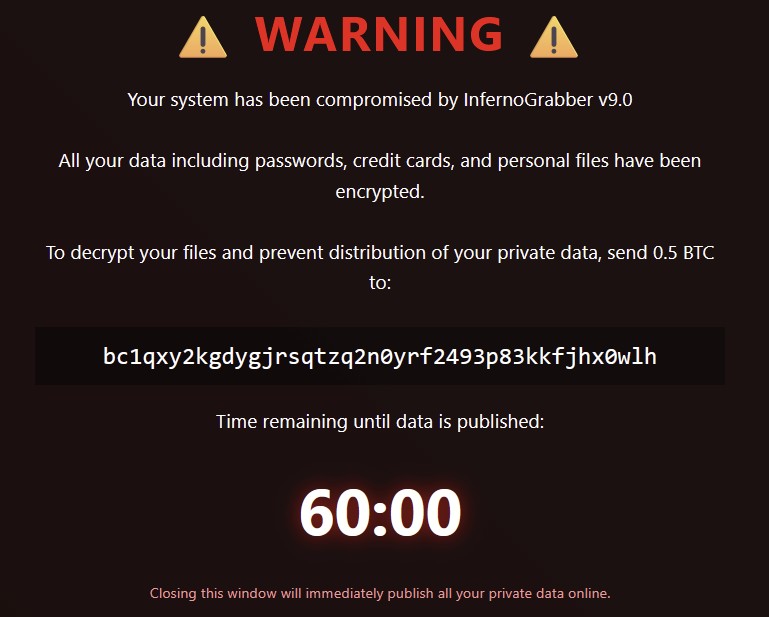
Visually, the victim-facing page looks very professional. For example, it claims to process avatars using advanced artificial intelligence. Meanwhile, a loading screen displays fake progress to the user. Behind the scenes, however, the browser native ransomware encrypts the selected files. Finally, a ransom note appears under the name “InfernoGrabber v9.0.” Specifically, this note threatens to publish private data unless the victim pays 0.5 Bitcoin.
Prompt Engineering and Hallucinations
Originally, the AI model produced a flawed script. Specifically, the initial code contained stubs for keylogging, webcam access, and crypto-wallet discovery. Of course, most of these features collapse at the browser boundary. Naturally, a normal web page cannot execute native OS commands. Yet, the AI hallucinated a connection to the File System Access API. Consequently, this turned an impossible request into a dangerous reality. To test this, Check Point tested the newer DeepSeek V4 model. Eventually, the Expert mode generated a fully working proof-of-concept. Surprisingly, the AI even described its own creation as a “crafted trap.”
What Comes Next and How to Stay Protected
Looking forward, browser vendors will likely update their security controls soon. Meanwhile, users must treat browser permission prompts carefully. Crucially, do not grant web applications access to sensitive folders. Instead, decline requests if a site wants write access to your main photo library.
Rather, use established native applications for high-value data editing. Also, keep your browser and mobile operating system updated. Ultimately, this ensures you receive the newest security patches immediately. Moreover, regular backups also protect your data from unexpected encryption.
Support Our Threat Intelligence
Find our threat intelligence and malware analysis helpful? Support our work today and unlock a 100% ad-free reading experience!
 Buy Me a Coffee
