The Fake VPN Trap: Microsoft Warns of Storm-2561 SEO Poisoning Campaigns Stealing Corporate Credentials
 Do Son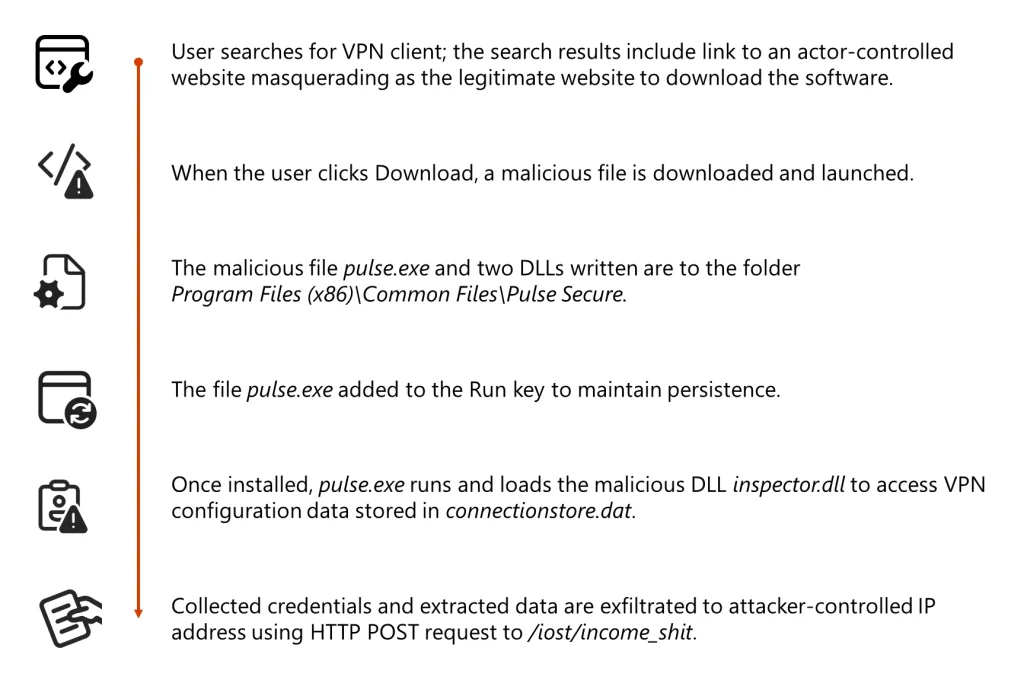
Storm-2561 campaign attack chain
Cybersecurity investigators at Microsoft Defender Experts have sounded the alarm on a deceptive credential theft campaign targeting the modern remote workforce. The threat, attributed to the cybercriminal actor Storm-2561, utilizes high-ranking search engine results to trick users into downloading what they believe are legitimate enterprise VPN clients.
Active since May 2025, Storm-2561 has mastered the art of “SEO poisoning”—manipulating search engine algorithms so that their malicious websites appear at the top of results for software queries. When employees search for their company’s VPN software, they are redirected to attacker-controlled GitHub repositories hosting malicious ZIP files.
“By targeting users who are actively searching for enterprise VPN software, attackers take advantage of both user urgency and implicit trust in search engine rankings“.
To further build a false sense of security, the group’s malware is often “digitally signed by a legitimate certificate,” a tactic that bypasses standard operating system warnings and encourages the user to proceed with the installation.
The malware is designed to look and feel exactly like a legitimate Pulse Secure VPN client. Once the user runs the installer, a multi-stage theft begins:
- Credential Harvesting: A fake login prompt captures the user’s VPN credentials.
- Configuration Theft: A malicious component named
inspector.dllscans the system to steal existing VPN configuration data from the device’s local connection store. - Persistence: The installer adds the malware to the Windows RunOnce registry key, ensuring the threat remains active even after a reboot.
The most sophisticated aspect of the Storm-2561 playbook is how it handles the “failure” of the fake app. After the credentials have been stolen, the malware displays a convincing error message indicating the installation failed.
The user is then helpfuly “instructed to download and install the legitimate Pulse Secure VPN client” from the official vendor website.
“If users successfully install and use legitimate VPN software afterward… there are no indications of compromise to the end user. Users are likely to attribute the initial installation failure to technical issues, not malware”.
As employees continue to rely on VPNs for secure access, Microsoft highlights that basic security hygiene is the most effective defense.
Defense Recommendations:
- Official Sources Only: Educate employees to only download enterprise software from internal portals or direct links provided by the IT department, rather than through public search engines.
- Monitor Endpoint Activity: Watch for unusual registry modifications, particularly in the
RunOncekeys, and unauthorized access to VPN configuration stores. - Verify Certificates: While the group uses signed code, the underlying certificates are often quickly revoked once identified. Use endpoint security that performs real-time certificate revocation checks.
Support Our Threat Intelligence
Find our threat intelligence and malware analysis helpful? Support our work today and unlock a 100% ad-free reading experience!
 Buy Me a Coffee
