Bypassing the Bottleneck: How Microsoft’s Native NVMe Driver Delivers an 80% IOPS Surge
 Do Son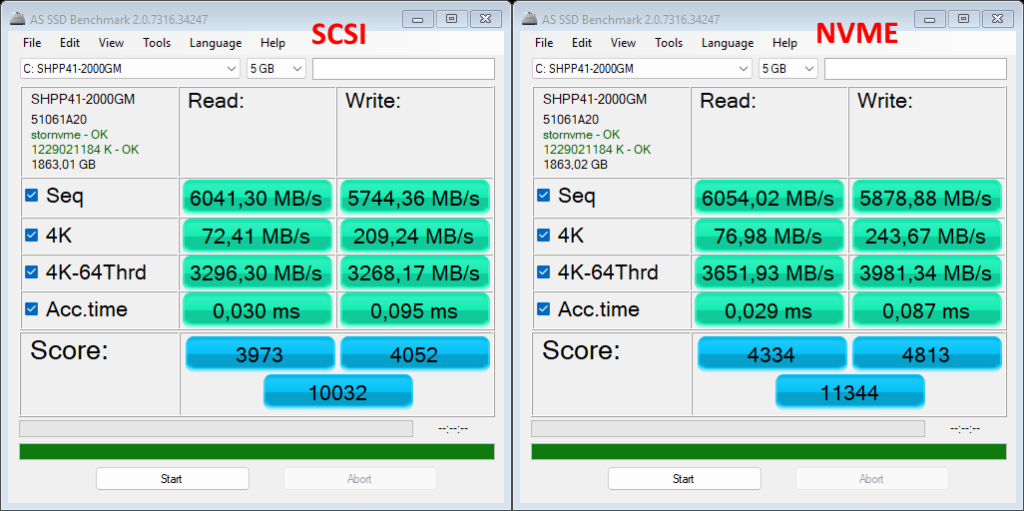
Image: @pureplayerpc
Microsoft has introduced a newly developed native NVMe SSD capability in the Windows Server 2025 operating system. This feature is, in essence, an entirely new driver that bypasses the legacy SCSI interface and command translation layer, thereby delivering a meaningful performance uplift.
Although solid-state drives already outperform traditional hard disks by a wide margin, historical design constraints have meant that SSDs still rely on the SCSI abstraction layer. As a result, even high-performance NVMe drives can suffer measurable efficiency losses when forced through this legacy interface.
Microsoft’s native NVMe SSD initiative is therefore designed to unlock greater performance for server platforms such as Windows Server 2025—a development of particular significance for enterprises. In data-intensive workloads, especially scenarios involving databases like Microsoft SQL Server, performance gains can be substantial. Native NVMe support is already available in Windows Server 2025 (with the October 2025 update or later). While no equivalent feature is officially exposed in Windows 11, users have discovered that Microsoft appears to be testing similar functionality in Windows 11 version 25H2.
Specifically, after installing the latest updates for Windows 11 25H2, the native NVMe SSD feature can be enabled through registry modifications, allowing users to benchmark potential performance improvements on their own hardware. Test data shared by @pureplayerpc shows that on an SK hynix Platinum P41 2TB SSD, enabling native NVMe support raised the AS SSD benchmark score from 10,032 to 11,344—a 13% increase. Random write performance saw the most dramatic gains, with 4K and 4K-64Thrd results improving by 16% and 22%, respectively. Another user, Cheetah2kkk, reported results using a Crucial T705 4TB SSD installed in an MSI Claw 8 AI+ gaming handheld. While sequential read and write speeds changed little, random I/O performance improved markedly: random read throughput rose by 12%, while random write performance surged by an astonishing 85%.
These figures closely mirror Microsoft’s own internal testing. The company has emphasized that native NVMe SSD support primarily boosts IOPS performance, and both random read and random write benchmarks are direct measures of IOPS efficiency. Even a 20% improvement in random write performance represents a significant advance. In theory, modern NVMe SSDs already meet the needs of most gamers, developers, and content creators. Nevertheless, enabling native NVMe support should further enhance performance in large-scale games, and for developers, it is likely to deliver noticeable gains during compilation and build workloads. Overall, the benefits are clearly compelling.
That said, caution is warranted. Because this feature remains experimental in Windows 11, users who enable it manually via the registry should proceed carefully, as unexpected compatibility or stability issues cannot be ruled out. To enable native NVMe SSD support, navigate to the following registry path and add new DWORD (32-bit) values:
HKEY_LOCAL_MACHINE\SYSTEM\CurrentControlSet\Policies\Microsoft\FeatureManagement\Overrides
- “735209102”=dword:00000001
- “1853569164”=dword:00000001
- “156965516”=dword:00000001
Please note that due to driver-related limitations, some SSD models may not support this feature.
Related Posts:
- The End of SCSI: Windows Server 2025 Unlocks 70% Faster Storage with Native NVMe I/O
- Windows 11 Gaming Guide: Microsoft’s Recommended PC Specs for 1080p to 4K
- Windows 11 25H2 Update Is Here: What’s New?
- SanDisk Unveils World’s Largest SSD: The 256TB UltraQLC Drive Built for the AI Era
Support Our Threat Intelligence
Find our tech and OS security coverage helpful? Support our work today and unlock a 100% ad-free reading experience!
 Buy Me a Coffee
