 Do Son
| At a glance | |
|---|---|
| Malware | Malicious browser extension / search hijacker (“Search for perplexity ai”) |
| Threat actor | Not attributed; operator-controlled infrastructure only |
| Targets | Chromium browser users looking for AI search tools |
| Delivery | Chrome Web Store listing spoofing Perplexity AI; look-alike domain |
| Capabilities | Default-search override, Omnibox query and keystroke capture, two-hop redirect |
| Source | Microsoft Threat Intelligence |
TL;DR
Microsoft found a fake Perplexity AI extension on the Chrome Web Store. It hijacked browser search and logged every query and keystroke. Google removed it after Microsoft reported the issue.
How the fake Perplexity AI extension spread
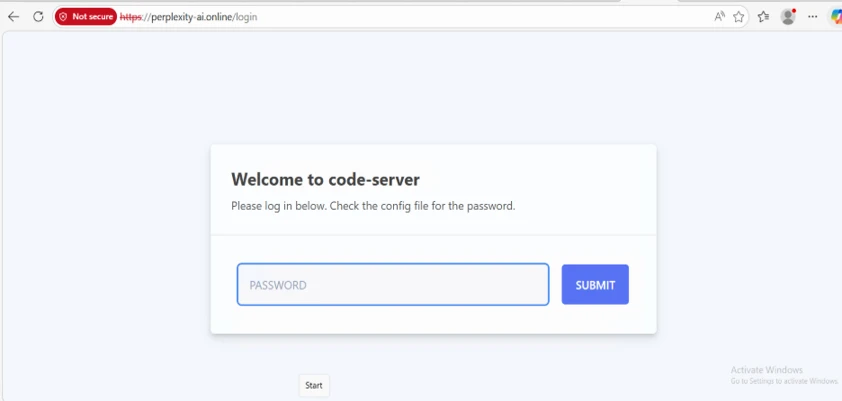
The add-on copied Perplexity’s branding to look real. It listed on the Chrome Web Store as “Search for perplexity ai.” Its support site used a look-alike domain that mimicked Perplexity’s real one.
After install, it opened a slick onboarding page. That page built trust and hid the changes it made to search settings.
How the search hijacking worked
The extension set itself as the browser’s default search provider. From then on, it captured what users typed in the address bar. A second setting also sent live search suggestions to the operator’s server.
So every typed character left the browser before any result loaded. As Microsoft put it, “This constitutes active user surveillance (keystroke-level capture) beyond simple search redirection.”
A two-hop redirect that hid the theft
The trick relied on two hops. First, the browser sent the query to the attacker’s domain, which logged it with headers and the user’s IP. Then a rule bounced the user to a real engine like Google or Bing.
The victim saw normal results and noticed nothing. Microsoft found the extension shipped with its own server code, which proved the logging was built in, not a side effect. The package even held disabled rules for Google and Bing, a hint at wider hijacking plans.
The build was modular by design. A background component could switch rule sets per provider on demand. That structure let one extension target Perplexity today and other engines later, with no visible change to the user.
Permissions a search tool should not need
The extension asked for network-rewriting powers through Manifest V3’s declarativeNetRequest API. A real AI search add-on has no need for those. It also allowed WebAssembly, which leaves room for future code without further review.
Who is behind it
Microsoft did not link the fake Perplexity AI extension to any named threat actor. The report points only to operator-controlled infrastructure. So attribution is not established.
Microsoft assessed the goal as search interception and data collection. It found no firm proof of credential theft. Even so, the access requested created real privacy and security risk.
This fits a growing wave of AI-themed extension abuse. Separately, Microsoft has tied a chat-skimming campaign to roughly 900,000 installs across more than 20,000 networks. Attackers keep using trusted AI brands to win quick installs.
How to stay protected
Audit your installed extensions and remove anything you do not recognize. Be wary of any add-on that wants to change your default search. Confirm an AI tool comes from its official vendor, not a look-alike site.
For teams, allow only approved extensions through browser policy. Then watch for changed search settings and traffic to unfamiliar search domains. User awareness training also helps, since AI branding now drives these lures.
If you ran “Search for perplexity ai,” remove it and reset your default search engine. After that, review your browsing history and recent searches for anything sensitive. Microsoft also published indicators and hunting queries that defenders can use to spot the extension and its traffic.
Support Our Threat Intelligence
Find our threat intelligence and malware analysis helpful? Support our work today and unlock a 100% ad-free reading experience!
 Buy Me a Coffee
