Google Drive Desktop Gets Major Redesign: Unified UI Centralizes Files, Sync & Notifications
 Do Son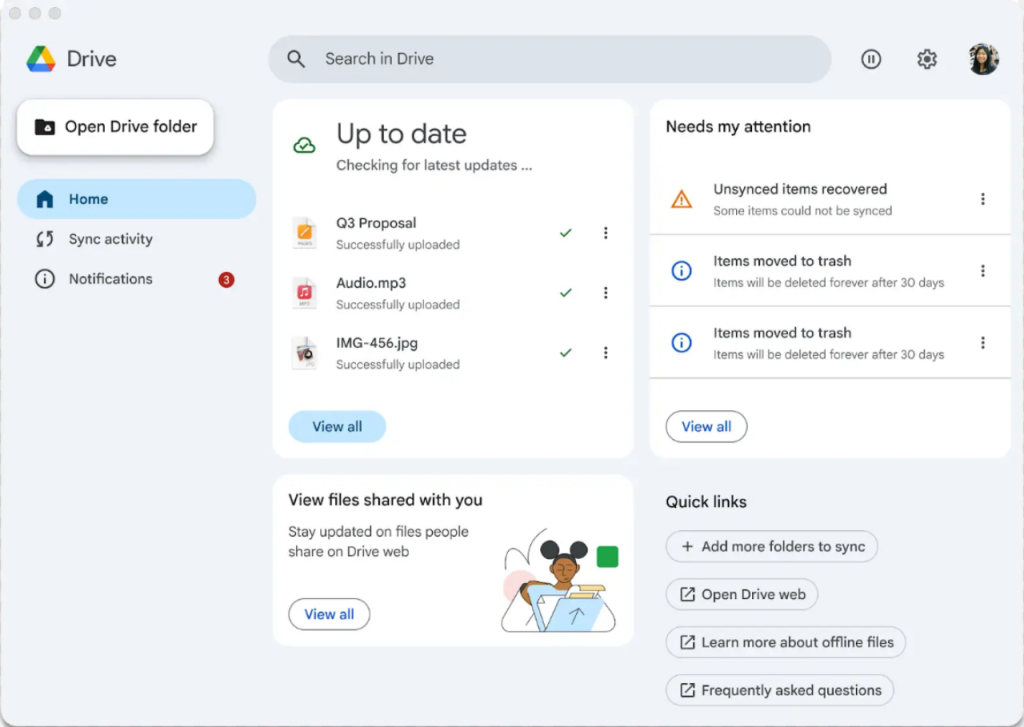
Google is rolling out a redesigned user interface for the desktop version of Google Drive, introducing a unified view that elegantly consolidates notifications, settings, sync activities, and shared files. However, the latest version still does not support full-screen mode.
The previous iteration of the desktop client offered limited functionality and a rather austere UI, as most users preferred the web-based version. Nevertheless, since the desktop app enables seamless file synchronization, it remains an essential tool for a subset of users.
With this update, users of the desktop version can expect a significantly improved experience—particularly through streamlined access to key activities without the need to navigate multiple menus. The new interface is available to all users, including both Google Workspace customers and individual account holders.
Note that the new UI is being rolled out gradually. If your current installation has not yet received the update, you may manually upgrade by downloading the installer above—upon doing so, the refreshed interface should become immediately available.
Lastly, Google provides individual users with 15GB of complimentary cloud storage, shared across Google Drive, Google Photos, and Gmail. Once this limit is exceeded, users must purchase additional storage to continue expanding their digital space.
Those interested can download the updated Google Drive desktop client via the following links:
Related Posts:
- Windows 11 Gets a Makeover: Redesigned “Start” and Enhanced Sharing
- Google Chrome Tests AI-Driven Auto Password Change for Breached Accounts
- Privilege Escalation Flaws in Cisco Unified Intelligence Center Threaten User Data Integrity
- Google Launches Unified Security Powered by Gemini AI, Enhances Enterprise Protection
- iOS 26 Unveils New Wi-Fi Sync: Auto-Login for Public Networks Across All Your Apple Devices
Support Our Threat Intelligence
Find our tech and OS security coverage helpful? Support our work today and unlock a 100% ad-free reading experience!
 Buy Me a Coffee
