 Do Son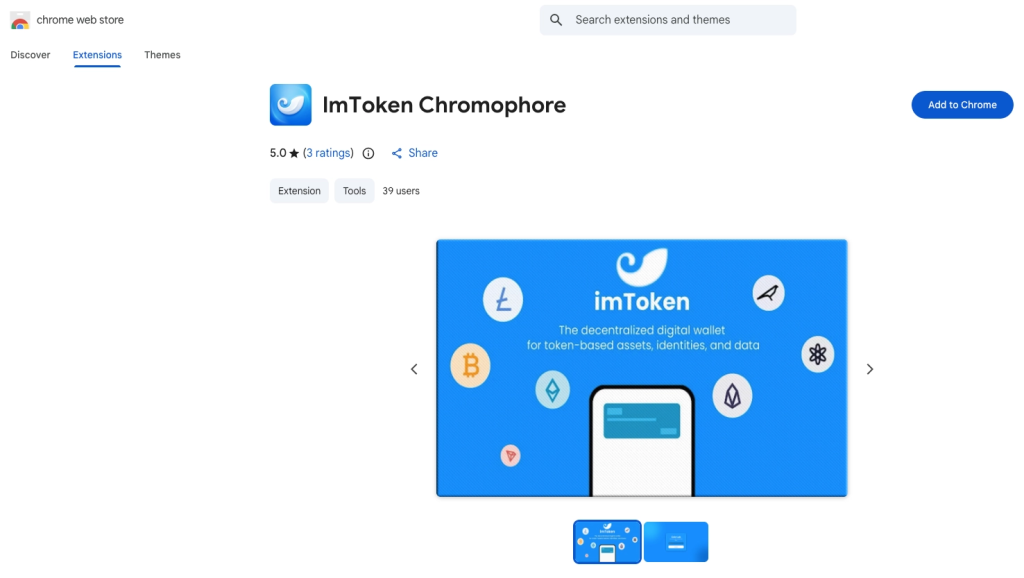
The malicious Chrome Web Store
In a sophisticated blend of deceptive branding and technical trickery, Socket’s Threat Research Team has uncovered a predatory Chrome extension designed to drain cryptocurrency wallets. Masked as a benign utility called “ImToken Chromophore,” the extension presents itself as a simple hex color visualizer for developers while secretly operating as a gateway for high-stakes phishing.
The attackers behind this campaign went to great lengths to build a sense of legitimacy. The Chrome Web Store listing adopted the official branding of imToken, a non-custodial wallet with over 20 million users worldwide. By adding the scientific-sounding word “Chromophore”—a light-absorbing molecule—the threat actors created a plausible cover for a tool that claimed to help users manage colors.
To further the illusion, the listing boasted 5-star ratings and a privacy policy claiming no data collection. As the Socket report notes: “The threat actor used familiar branding cues to make the malicious extension feel consistent with the real imToken product, which likely increased the chances that users would install it and follow the later phishing flow.”
Once a user installs the extension, the “color visualizer” facade disappears immediately. The extension does not contain any actual utility code; instead, its background script acts as a redirector.
Upon installation, the extension fetches a destination URL from a hardcoded JSONKeeper endpoint. It opens a tab to a lookalike domain—chroomewedbstorre-detail-extension[.]com—that mimics the official imToken onboarding experience.
The attackers used mixed-script Unicode homoglyphs to bypass security filters and fool users. For example, the “i” and “o” in the page title are actually Cyrillic characters that look identical to Latin letters to the naked eye.
Once on the phishing site, users are funneled into a “credential-capture flow”. The site offers two methods to “import” a wallet, both of which lead to immediate compromise:
- The Mnemonic Path: Requests the user’s 12 or 24-word seed phrase.
- The Private Key Path: Asks for the wallet’s plaintext private key.
To keep the victim from becoming suspicious, the site even includes a fake password setup screen and a “loading” message claiming the wallet is being upgraded. The final step of the ruse opens the legitimate token.im website in a separate tab, leaving the victim under the impression they have completed a real process while their secrets have already been stolen.
Despite imToken’s January 2026 security notice stating they only offer a mobile app and have no official Chrome extension, the malicious tool managed to stay live with active users.
Socket’s researchers have reported the extension and the associated publisher account (liomassi19855@gmail[.]com) to Google for immediate removal. Users are urged to audit their extensions and remember that a legitimate wallet provider will never ask for your seed phrase or private key through a browser extension or a web-based “recovery” form.
Support Our Threat Intelligence
Find our threat intelligence and malware analysis helpful? Support our work today and unlock a 100% ad-free reading experience!
 Buy Me a Coffee
