 Do Son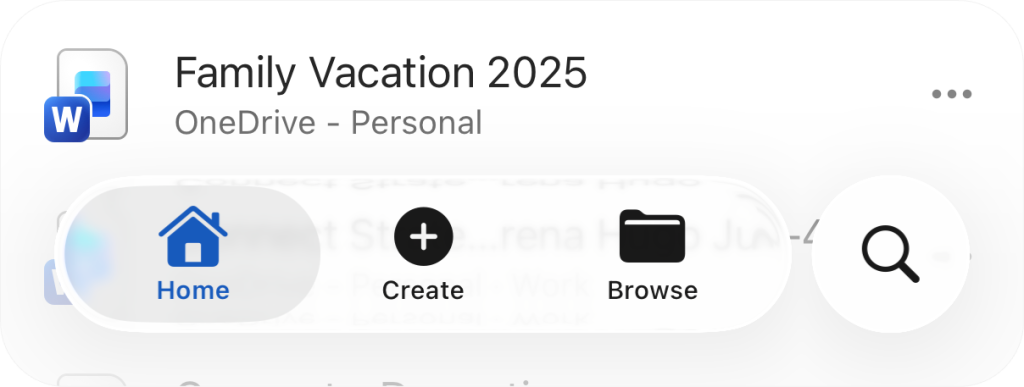
The Microsoft Design Team recently unveiled a new set of icons for Microsoft 365, now available across both desktop and mobile platforms. The latest iOS version introduces a refined aesthetic inspired by Apple’s Liquid Glass design language, which emphasizes translucency and a floating visual effect. In this redesign, the bottom navigation bar—including buttons such as Home, Create, and Browse—now appears elevated and floating, while the search button has been repositioned to the bottom, aligning seamlessly with Apple’s modern interface principles.
According to Microsoft’s official blog, the new Liquid Glass–enhanced version of Microsoft 365 is now rolling out globally to all iOS users, with no need to enroll in the Microsoft 365 Insider Preview Program to experience the updated design.
This update also introduces a new template filtering feature, allowing users to filter and switch between categories when creating new documents—making it far easier to locate preferred templates such as flyers, resumes, or invoices without scrolling through an extensive list.
iOS users can access the update directly via the Apple App Store. Word, Excel, and PowerPoint remain available as separate apps, giving users the flexibility to download one or multiple Microsoft 365 components according to their needs.
Related Posts:
- Firefox & Chrome are vulnerable to Side-channel attacking browsers via CSS3 feature
- Apple’s iOS 26: The Liquid Glass Revolution
- Apple Unleashes iOS 26, macOS Tahoe 26 Public Betas: Experience “Liquid Glass” & Major OS Overhauls
- Apple’s “Liquid Glass” Vision: iPhone 2027 & Unified OS 26
- Apple Unifies OS Versions to “26” and Unveils “Liquid Glass” Redesign
Support Our Threat Intelligence
Find our tech and OS security coverage helpful? Support our work today and unlock a 100% ad-free reading experience!
 Buy Me a Coffee
