 Do Son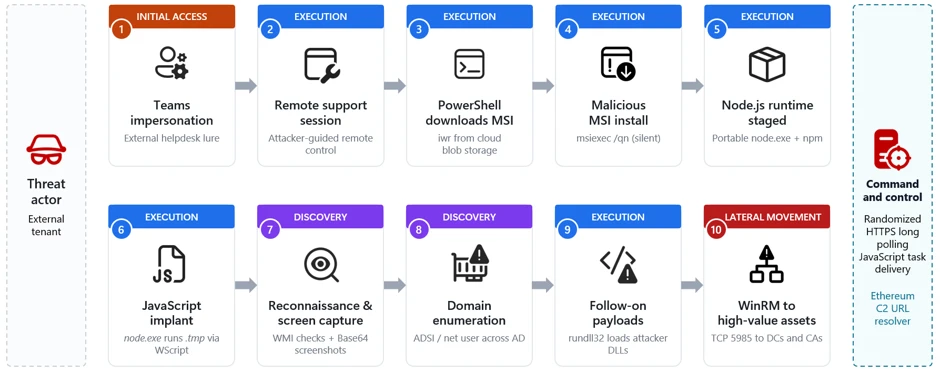
Teams phishing intrusion attack chain overview | Image: Microsoft
At a glance
| Actor or group | Unattributed; Microsoft tracks it as a campaign, no named actor |
| Activity type | Social engineering, remote-access abuse, hands-on-keyboard intrusion |
| Targets | Enterprise users across regions; identity systems are the goal |
| Scale | Not disclosed; lateral movement seen across dozens of hosts |
| Status | Active campaign; no law-enforcement action reported |
| Source | Microsoft Threat Intelligence |
TL;DR
A threat actor poses as IT helpdesk staff inside Microsoft Teams. The victim grants a remote session, and a silent MSI installs a Node.js implant. The operator then maps Active Directory and moves toward domain controllers over WinRM.
What happened
The campaign starts with a Teams message or call from an external tenant. The operator poses as internal IT support. Microsoft maps this initial access to the technique known as spearphishing via service. As Microsoft explains, the activity “does not stem from a weakness in Microsoft Teams or its built-in protections.” Instead, the attacker talks the user into ignoring external-contact warnings.
Next, the victim opens a remote-assistance tool like Quick Assist and reads back a code. That hands the operator interactive control. Sometimes the attacker adds a phone call, or vishing, to build trust.
How the intrusion unfolds
Silent installer and Node.js implant
Inside the session, the operator runs PowerShell to fetch a malicious MSI from cloud storage. The installer uses update-themed names like “devfix” or “Hotfix.” A silent switch hides the install from the victim. The MSI then stages a portable Node.js runtime pulled from the official distribution.
This choice is deliberate. A signed, trusted runtime runs the attacker’s JavaScript implant without dropping suspicious binaries. The loader decrypts the implant in memory or into a temporary file. As a result, the backdoor blends into normal enterprise activity.
Command-and-control and screen capture
The implant then beacons to its C2 server. It uses randomized HTTPS long-polling to receive JavaScript tasks. The server’s responses run as live code with full system access. Operators repeatedly captured the victim’s screen, encoded it, and staged it for exfiltration.
The malware also hid a dormant trick. It carried logic to query an Ethereum smart contract for an updated C2 address. That feature was disabled in the recovered builds, which used a hard-coded fallback server instead.
Reconnaissance and lateral movement
After validating the foothold, the operator expands quietly. Native commands and ADSI queries enumerate domain accounts, servers, and user attributes. Randomized sleep jitter keeps the activity below noisy-scan thresholds. Follow-on payloads run through rundll32 loading attacker-supplied DLLs.
The endgame is lateral movement. Operator tasking opens WinRM connections over TCP port 5985 to many domain-joined systems. The target list includes file servers, application servers, and, critically, domain controllers and certificate authorities. Microsoft notes this WinRM use “strongly suggests credential-backed lateral movement directed by an external operator.”
Who is behind it
Microsoft did not attribute the campaign to any named group. So attribution remains open. Independent reporting notes the fake-helpdesk method resembles tactics linked to North Korean actors, but that is an observation, not a confirmed link. No law-enforcement action has been announced. Readers should treat any actor label as unproven for now.
Impact and scale
Microsoft did not publish a victim count. Still, the reach is alarming. One approved Teams chat can end in credential-backed access to identity infrastructure. That pattern often precedes data theft, extortion, or ransomware. Targeting domain controllers and certificate authorities marks a shift toward full enterprise control.
How to stay protected
Start with policy. Restrict external Teams contact to trusted domains only. Also limit or block unapproved remote-support tools like Quick Assist. Train staff that real IT never cold-calls to demand remote control. Then watch for a remote-assist process spawning PowerShell or cmd on the same desktop.
Defenders should also hunt for telltale artifacts. Look for Node.js running from a user’s LocalAppData folder. Flag unexpected WinRM connections on port 5985 toward domain controllers. Finally, audit for update-themed persistence entries named “EdgeUpdate.” These signals catch the campaign before it escalates.
Support Our Threat Intelligence
Find our threat intelligence and malware analysis helpful? Support our work today and unlock a 100% ad-free reading experience!
 Buy Me a Coffee
