 Do Son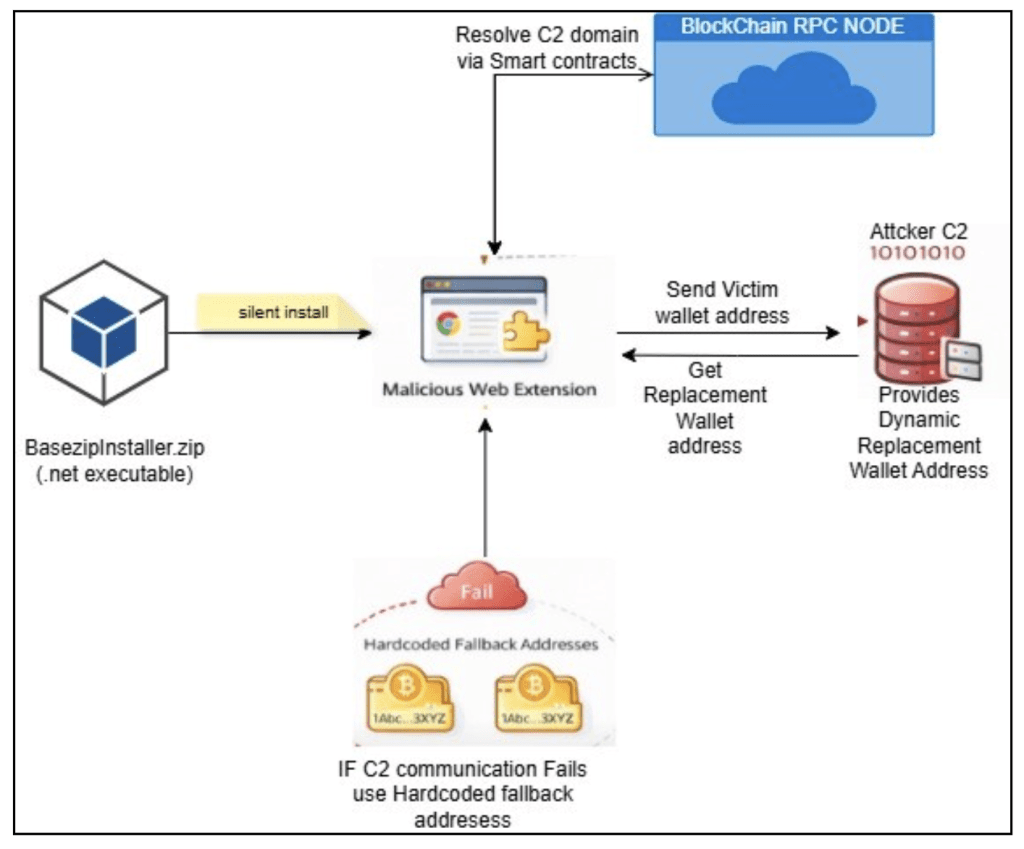
How the extension works in a nutshell | Image: McAfee Labs
Unsigned software installers are distributing a dangerous new malware strain that quietly intercepts digital currency transactions. Security analysts recently uncovered the Silent Swap crypto clipper, a malicious browser add-on. This malware steals digital assets by hijacking the system clipboard. It specifically targets users who manage their funds through web browsers.
- Malware family: Silent Swap (Crypto clipper)
- Threat actor: Suspected operator behind the CountLoader campaign
- Targets or victims: Consumer cryptocurrency users globally (high concentration in India)
- Delivery vector: Unsigned .NET and Golang installers
- Key capabilities: Browser preference tampering, EtherHiding C2 resolution, dynamic wallet substitution
- Source: McAfee Advanced Threat Research
TL;DR
The Silent Swap crypto clipper operates as a fake Google Notes extension. It intercepts copied cryptocurrency addresses and replaces them with attacker-controlled wallets. Because blockchain transfers are irreversible, victims lose their funds instantly upon transaction confirmation.
Delivery
Attackers distribute the malware through unsigned .NET and Golang installers. Users typically download these executable files from unverified software sources. Once executed, the installer deploys a malicious Chromium extension onto the system. It masquerades as a benign Google Notes extension. The fake application features a clean icon and a simple note-taking user interface. This visual cover dampens user suspicion upon manual inspection. However, the true malicious logic runs silently in background service-worker scripts. The extension requests disproportionate permissions. It demands access to all URLs, browsing history, and clipboard data.
Infection Chain
The infection process bypasses normal browser security prompts entirely. The malware never uses the official Chrome Web Store. Instead, it modifies protected browser configuration files directly. The installer forces the extension into Chromium-based browsers like Google Chrome, Brave, Opera, and Microsoft Edge. It achieves this by altering the Secure Preferences file within the user profile directory. Browsers normally use hash values to detect unauthorized configuration changes. The installer recalculates these integrity security values after tampering with the files. This trick forces the browser to believe the installation was legitimate. The extension loads silently without user approval. Finally, the installer launches a hidden command prompt to delete itself from the disk. This self-deletion removes the most obvious indicator of compromise.
Command-and-Control and Data-Exfiltration
This malware features highly unusual command-and-control behavior. It does not rely on a fragile, hardcoded server domain. Instead, the malware uses an evasion technique called EtherHiding. It queries a public blockchain smart contract to resolve its active server address. This method makes infrastructure takedowns extremely difficult. When a user copies a wallet address, the extension detects the specific cryptocurrency format. It then sends the copied data to the attacker’s server. The server replies with a replacement wallet address. The extension overwrites the user’s clipboard immediately. For Bitcoin, Ethereum, and Dash, the attacker generates a unique replacement address per victim. For Solana, all victims send funds to a single drop wallet. McAfee researchers estimate one specific attacker Ethereum wallet held approximately $1,902 in stolen funds. Global telemetry shows a high concentration of victims in India. The researchers state, “This campaign is a concise illustration of where consumer-targeted cryptocurrency theft is heading.” The report adds, “Static attacker addresses have been replaced with a server-side, per-victim mapping.”
Defense or Detection Guidance
To stay safe, always visually verify the first and last six characters of a recipient address. You must check these details before confirming any transfer. You should install browser add-ons only from official web stores. Review the permissions granted to your active extensions regularly. A standard note-taking tool never needs access to your browsing history or clipboard data. You must avoid downloading cracked software from unofficial sources. Finally, keep your endpoint protection updated to block known malicious domains.
Support Our Threat Intelligence
Find our threat intelligence and malware analysis helpful? Support our work today and unlock a 100% ad-free reading experience!
 Buy Me a Coffee
