 Do Son
At a glance
| Campaign | Counterfeit software-download / fake installer campaign |
| Threat actor | Consistent with Silver Fox (Yinhu); moderate-confidence, not nation-state |
| Targets | China-based operations and Chinese-speaking users; many sectors |
| Delivery vector | Spoofed vendor download sites serving trojanized installers |
| Key capabilities | Persistence, SYSTEM privilege abuse, Defender tampering, C2 |
| Source | Microsoft Defender Experts |
TL;DR
Attackers built high-fidelity clones of popular software sites. Victims download fake software installers that quietly deploy malware. The malware then weakens Windows Defender, blocks Windows Update, and beacons to attacker servers.
Why this matters
This threat exploits a routine habit: searching for an app and clicking the top result. Microsoft describes a chain that runs “from a spoofed vendor download page to a self-protecting, persistent implant.” So a single careless download can compromise an entire host. The victims span healthcare, manufacturing, gaming, technology, logistics, government, and education.
Delivery: spoofed download sites
The entry point is a fraudulent download page that clones a real vendor. These lure domains mostly use .com.cn and .hl.cn names that embed the brand. Each page shows a prominent “Download now” button. All of them funnel to the same delivery and payload infrastructure.
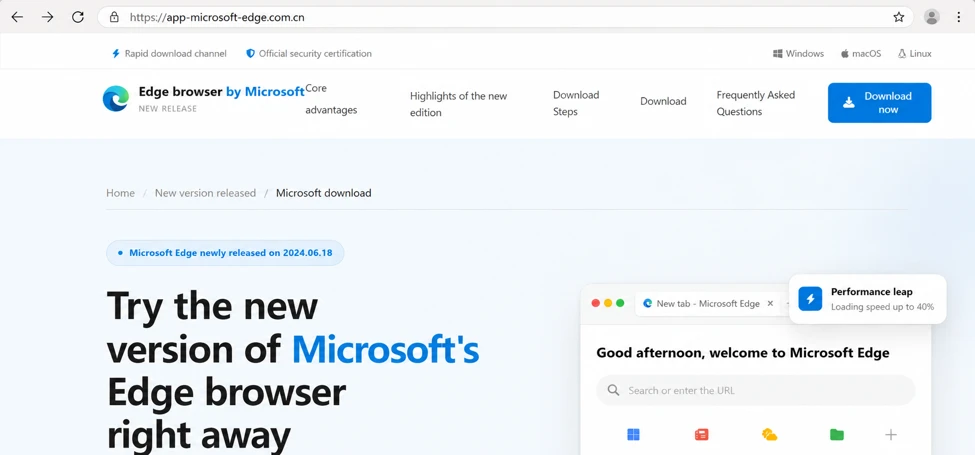
The fake software installers use a clever evasion trick. The archive keeps the same filename, but its hash changes on every download. Microsoft calls this “a strong indicator the payload is generated server-side, per request.” As a result, simple hash or filename blocklists fail.
Infection chain
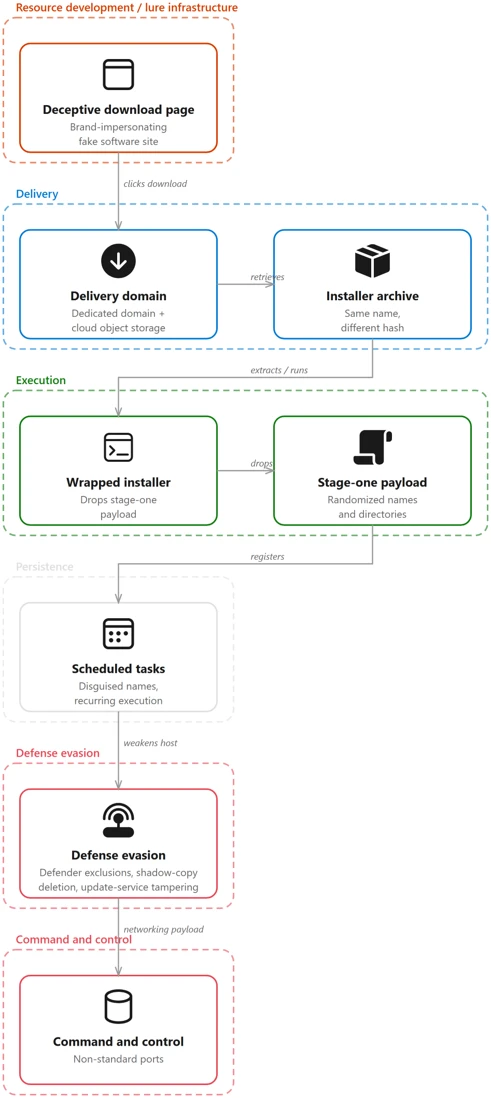
The attack unfolds as a clear process tree. First, the browser saves the malicious archive. Next, an archiving tool extracts it. Then a wrapper installer runs and launches a stage-one payload. That payload lands at a randomized path, though its content stays stable.
Microsoft also saw a second execution route through the Windows Installer service. There, msiexec.exe runs in embedded mode and drops a randomized payload. This gives the malware execution under a signed, trusted Windows component. Payloads also masquerade as legitimate software, using fabricated version metadata from real vendors.
Persistence and privilege escalation
The malware hides persistence inside scheduled tasks with dull, IT-sounding names. Two examples are “Deadline Mission Target” and “Hierarchy Tools Smooth Inventory.” Because the Task Scheduler relaunches them, hosts show a roughly 60-second re-execution cadence.
For privileged actions, the malware creates a short-lived task that runs as SYSTEM. It then writes Defender exclusions and deletes the helper task at once. Microsoft also observed process injection into a trusted user application.
Defense evasion and C2
Follow-on payloads weaken the host in layers. They add sweeping Defender path exclusions through PowerShell and a SYSTEM registry write. They delete volume shadow copies to block recovery. They also neutralize Windows Update by stopping its services and renaming update libraries. On some devices, the malware wrote a malicious application-control policy to the code-integrity store.
For command and control, later-stage payloads reach out over non-standard ports. The dedicated C2 tier uses short six-character .net domains and IP-and-port endpoints. Notably, that tier was often offline. Meanwhile, the same payloads still connected to attacker-controlled Alibaba Cloud object storage over TLS, which acted as resilient staging.
Attribution
Microsoft assessed the activity with moderate confidence. It matches the publicly reported Silver Fox, or Yinhu, fake software campaign. However, Microsoft “has not attributed it to a nation-state actor.” Independent reporting links Silver Fox to earlier delivery of Gh0st RAT and ValleyRAT.
Detection and mitigation
Block downloads from untrusted software sources first. Direct users to official vendor sites and verified app stores. Read the full Microsoft Defender Experts report for the complete indicators. Keep SmartScreen, network protection, tamper protection, and Defender XDR enabled. Finally, hunt for scheduled tasks with odd names and for Defender exclusion writes.
Support Our Threat Intelligence
Find our threat intelligence and malware analysis helpful? Support our work today and unlock a 100% ad-free reading experience!
 Buy Me a Coffee
