The Spy in Your Sidebar: Fake AI Browser Extensions Steal Data from 900,000 Users
 Do Son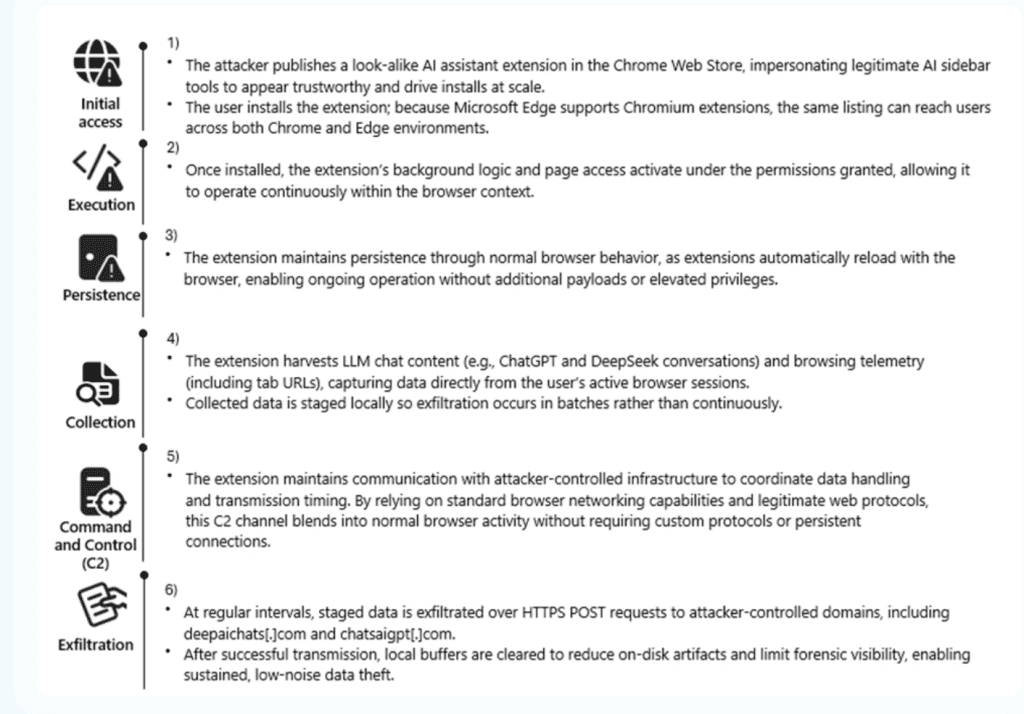
Attack chain
A seemingly helpful AI assistant could be a silent spy in your browser. Microsoft Defender Security Research has uncovered a massive campaign involving malicious Chromium-based browser extensions that impersonate legitimate AI tools to harvest sensitive user data.
The operation has reached a huge 900,000 installs, with telemetry confirming active data exfiltration across more than 20,000 enterprise tenants.
The attack begins with a classic bait-and-switch. The threat actor publishes look-alike AI assistant extensions in the Chrome Web Store, designed to “impersonate legitimate AI sidebar tools to appear trustworthy and drive installs at scale”.
Because modern browsers like Microsoft Edge support Chromium extensions, a single malicious listing can effectively compromise users across multiple platforms. Once installed, these extensions become a “persistent data collection mechanism embedded in everyday enterprise browser usage”.
The goal of the campaign is the wholesale theft of intellectual property and internal workflows. The extensions use background scripts to log nearly every URL visited and, more critically, capture the full content of AI interactions.
Data currently being harvested includes:
- Full AI Chat Histories: Complete prompts and responses from platforms like ChatGPT and DeepSeek.
- Internal Navigation: Full URLs of internal corporate sites and private dashboards.
- Contextual Metadata: Previous and next navigation context, model names, and unique user identifiers (UUIDs).
As researchers noted, this data provides attackers with “insight into internal applications, workflows, and potentially sensitive information that users routinely shared with AI tools”.
The malware is designed to stay hidden and keep the data flowing. The research team found that the extensions periodically upload Base64-encoded JSON blobs to remote endpoints, such as deepaichats[.]com.
In a particularly deceptive move, the threat actor built in a mechanism to override user privacy choices. “Telemetry was enabled by default after updates, even if previously declined,” the report explains, “meaning users could unknowingly continue contributing data without explicit consent”.
Recommendations for Organizations:
- Inventory Extensions: Use endpoint management tools to audit and inventory all installed browser extensions across the enterprise.
- Implement Allowlists: Move toward a “deny-by-default” model for browser extensions, only allowing those that have been vetted for security and privacy.
- User Awareness: Educate employees on the risks of “side-loading” or installing AI tools from unverified publishers, even within official web stores.
Support Our Threat Intelligence
Find our threat intelligence and malware analysis helpful? Support our work today and unlock a 100% ad-free reading experience!
 Buy Me a Coffee
