 Do Son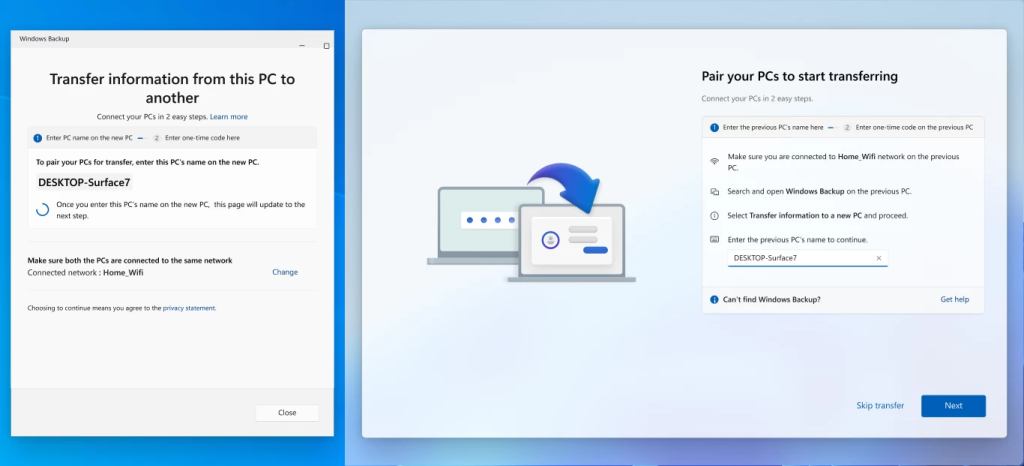
In July 2025, Microsoft began testing a PC-to-PC migration feature within the Windows 11 Insider Preview builds. This tool used the Windows Backup app to help users transfer hard drive data to a new machine. However, Microsoft recently updated its Windows Insider release notes to confirm the sudden removal of this migration feature. The company now advises users to return to the standard Windows Backup and Restore tools.
An Ineffectual Feature Better Left Discarded
After enduring a year of beta testing, this migration capability never reached the stable release of Windows 11. The main reason likely stems from its poor performance, making it very unappealing to the average user. Calling it useless is entirely justified. The Windows 11 migration feature never genuinely supported full system transfers to a new computer. Despite the grand name of “migration”, the tool basically only moved specific personal files.
For example, users could easily relocate personal documents, basic settings, and some personalization choices. However, the system completely failed to migrate installed apps, integrated OneDrive files, saved passwords, and crucial login details. Users could theoretically use Windows Backup to move their entire hard drive contents. Yet, it completely failed to copy the complex registry entries, software settings, and authorization tokens from installed programs.
Consequently, achieving a smooth, whole-machine migration through this native feature remained an absolute impossibility. Users benefit far more from utilizing dedicated third-party software. This software can capture the system drive as an image before reinstalling the system on the new computer. We recently finished a complete computer migration in our office. We completely ignored the native Windows 11 utility for this important task. Instead, we relied upon reliable third-party tools to finish a flawless system transfer.
Microsoft Now Recommends Cloud Storage Transfer
Following the decisive removal of the PC-to-PC migration feature, Microsoft highly recommends the standard Windows Backup framework. This method involves backing up specific folders, system settings, and partial account data directly to a Microsoft account. Next, users must log in with the exact same Microsoft account on their new machine to restore data.
Alternatively, people can use OneDrive to continuously back up critical directories. This includes the desktop, documents, and pictures folders, allowing easy restoration on the new device. However, both Windows Backup and OneDrive rely heavily upon cloud storage services. Therefore, this strategy practically requires a paid Microsoft 365 subscription. Otherwise, the free storage limit proves hopelessly insufficient for any meaningful data migration.
Support Our Threat Intelligence
Find our tech and OS security coverage helpful? Support our work today and unlock a 100% ad-free reading experience!
 Buy Me a Coffee
