 Ddos
Ddos 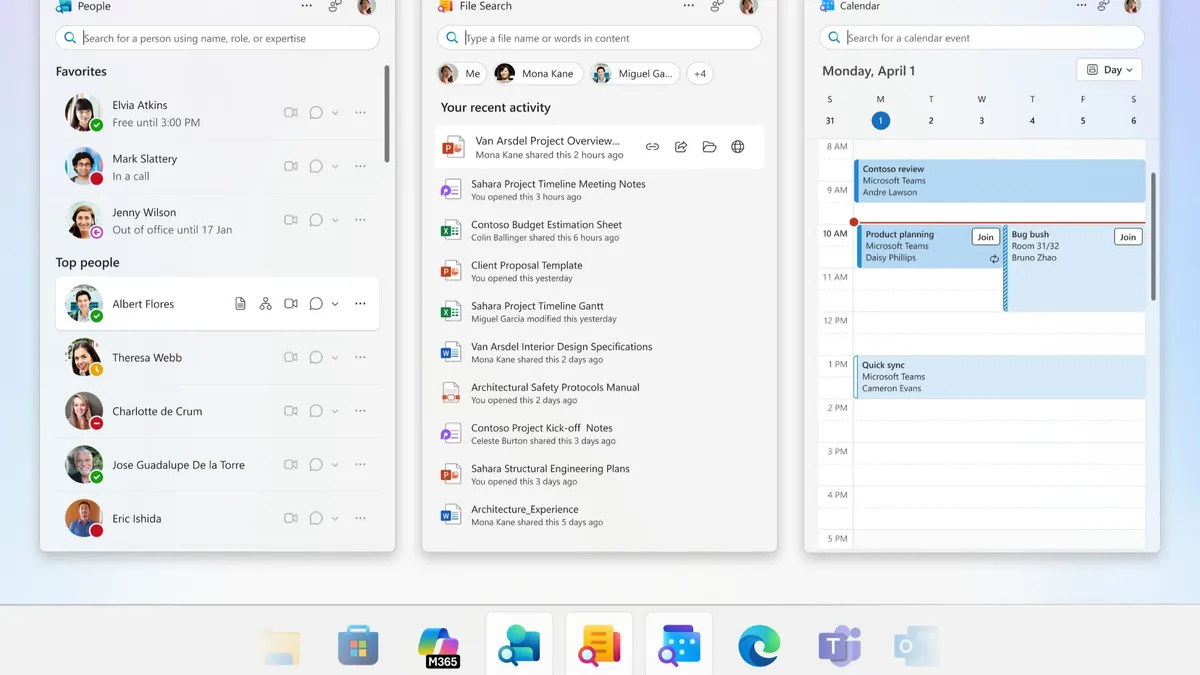
In 2024, Microsoft’s in-development People and File Search applications were leaked ahead of schedule. At that time, the projects were still under development and were therefore not released. Earlier this year, however, Microsoft officially announced both applications on its Tech Community platform.
These applications are positioned as companion tools for Microsoft 365, designed to help users focus on completing tasks quickly and efficiently. The People app allows users to view profiles, explore organizational charts, send messages, or search for contacts with just a few clicks.
The File Search app enables users to locate and share files rapidly—even without knowing the exact file name. It also offers a preview feature, allowing users to verify the file before sharing it.
A third new app, Calendar, syncs a user’s scheduled events and provides quick launch access from the taskbar. All three applications are pinned directly to the Windows taskbar by default, a key reason Microsoft refers to them as lightweight tools.
For now, these applications are available exclusively to Microsoft 365 Business and Enterprise subscribers. While individual users might benefit from certain features—such as the enhanced search capability—usage frequency for Calendar and People may be lower in personal contexts.
In its latest announcement, Microsoft confirmed that enterprises can join the Microsoft 365 Enterprise Preview Program and install the Microsoft 365 desktop apps. Once updated, these companion apps will be automatically installed and pinned to the taskbar.
In the official statement, Microsoft noted:
“Microsoft 365 companions is a suite of apps, including People, File Search, and Calendar, designed to enhance productivity through quick access to key tools directly from the Windows 11 taskbar. These lightweight apps integrate seamlessly with Microsoft 365, allowing users to efficiently look up contacts and navigate organization charts, locate files, view calendars and streamline workflows without distractions.”
For participants in the Enterprise Preview Program, the apps will be automatically deployed via Microsoft 365. IT administrators, however, can opt out of the trial from the admin center to prevent installation. Once installed, users may manually unpin the apps from the taskbar if desired.
Related Posts:
- Windows 11 Finally Brings Notification Center & Calendar to All Monitors
- Mac App Store discovers cryptocurrency Miner in “Calendar 2” application
- Zero-Click Calendar Invite: Critical macOS Vulnerability Chain Uncovered
- Zoom Unveils Custom AI Companion: Agent-Like AI Boosts Productivity Across 16 Business Apps
Support Our Threat Intelligence
If you find our CVE report and cybersecurity news helpful, consider supporting our work.
 Buy Me a Coffee
PayPal
Buy Me a Coffee
PayPal
