 Do Son
Earlier, encrypted email provider ProtonMail introduced a standalone two-factor authentication (2FA) tool. One might wonder why, given that Proton already offers Proton Pass, a password manager capable of handling both 2FA and passkey autofill. The answer lies in security: separating 2FA codes into a dedicated app significantly reduces risk.
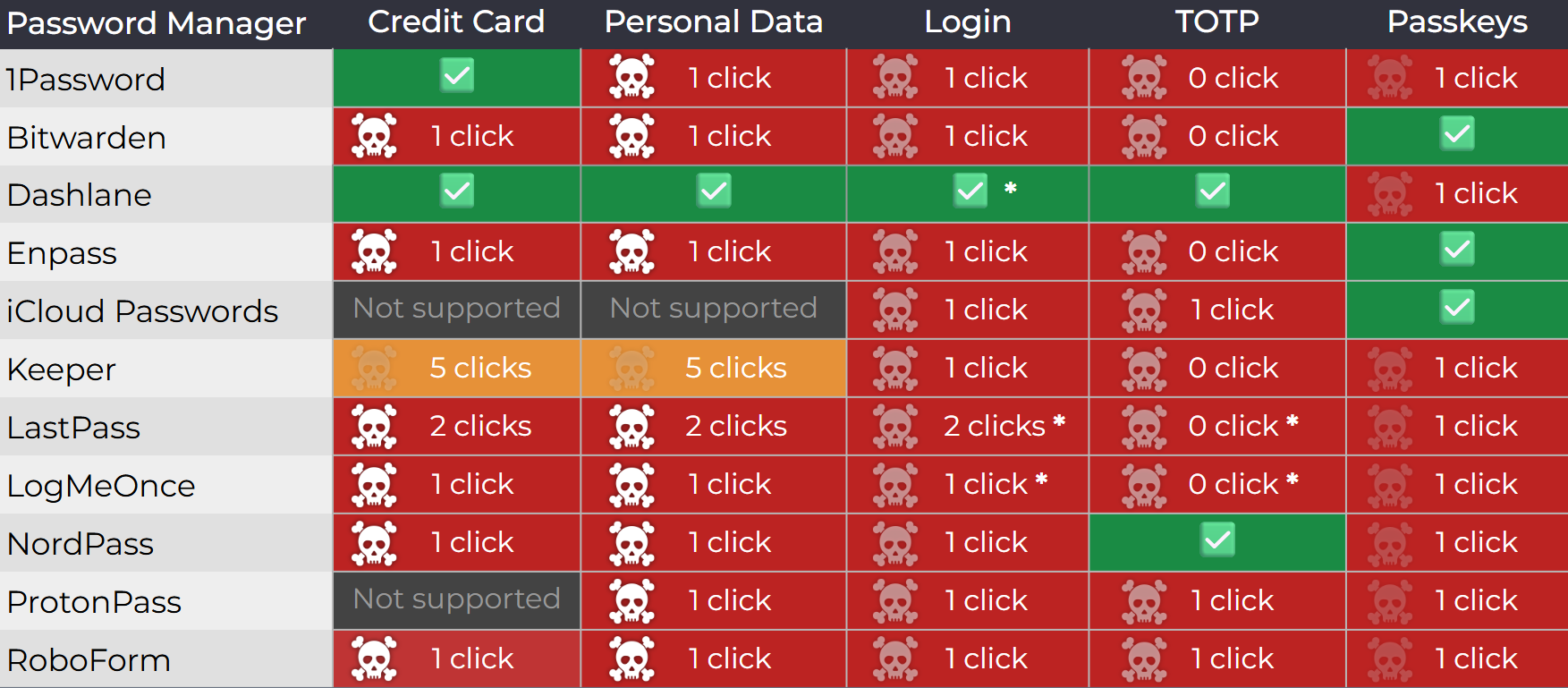
Recently, Czech security researcher Marek Tóth disclosed a clickjacking vulnerability affecting several well-known password managers. Exploiting this flaw, attackers could trick users into visiting specially crafted web pages and then steal critical account information, including passwords and even 2FA verification codes.
The technique involves embedding invisible iframes into malicious pages that are then hidden within legitimate websites. When a user interacts with the site—such as clicking a button—the action is hijacked by the iframe, which executes unintended commands. Although the method itself is not new, its effectiveness remains troubling.
For example, a website might display a cookie consent banner. When a user clicks “allow” or “deny,” the hidden iframe could intercept the click, triggering a login form. This, in turn, may prompt the password manager’s browser extension to auto-fill credentials, ultimately handing them over to the attacker.
Through such manipulation, attackers can harvest a wide array of sensitive data stored in password managers—account credentials, credit card details (including CVV2 codes), and 2FA tokens—posing a serious threat to users.
Most mainstream password managers are affected by this vulnerability. Proof-of-concept code has already been released, and as of this writing, some managers remain unpatched. 1Password and LastPass have labeled the flaw as “informational” and have yet to issue a fix. Bitwarden, by contrast, resolved the issue after four months of work, while others such as Proton Pass, RoboForm, and Dashlane have also patched their software.
Security experts recommend that users of password manager extensions manually disable autofill to reduce exposure. Once disabled, users must actively click on a password form to insert credentials, preventing silent data leaks. Bitwarden further suggests alternative filling methods, including keyboard shortcuts, right-click menus, or drag-and-drop, all of which avoid automatic insertion when a matching form is detected.
Password managers undeniably enhance convenience by sparing users from typing credentials and 2FA codes manually. Yet combining both within a single tool also creates risks like those described in this vulnerability.
By releasing a dedicated Proton Authenticator, ProtonMail provides an additional security layer: users may still enjoy autofill for usernames and passwords, but 2FA codes remain separate. Even if login credentials are compromised, attackers cannot access the account without the independently entered 2FA code.
Of course, manually entering a 2FA code slows down the login process—just as disabling autofill improves security but sacrifices convenience. In the end, the balance between safety and efficiency rests with each user.
If you rely on a password manager’s browser extension, be sure to check for updates. Several affected providers have already released patched versions—for instance, Bitwarden addressed the flaw in version 2025.8.0.
Related Posts:
- Microsoft Authenticator to Drop Password Manager Features by August 2025
- Proton Launches Standalone Authenticator: Separating MFA from Passwords for Ultimate Security
- Microsoft Authenticator’s Password Manager is Phasing Out: What You Need to Do!
- 184 Million Leaked Credentials Found in Open Database
- Google Password Manager Arrives as a Standalone App on Android
Support Our Threat Intelligence
Find our vulnerability reports and weekly recaps helpful? Support our work today and unlock a 100% ad-free reading experience!
 Buy Me a Coffee
