Attackers Abuse CyberPower PowerPanel Business to Run Code on a Domain Controller
 Do Son

| At a glance | |
| Actor | Unknown; Symantec has not attributed the activity |
| Activity | Abuse of UPS management software for SYSTEM-level command execution, credential theft, and implant deployment |
| Targets | A Windows domain controller running CyberPower PowerPanel Business |
| Scale | One intrusion analyzed; no data exfiltration or ransomware observed |
| Status | No law-enforcement action reported |
TL;DR
Symantec found an attacker using CyberPower PowerPanel Business, a UPS management tool, to run commands on a Windows domain controller. The product’s power-event script feature ran every command as SYSTEM. In this domain controller attack, the intruder copied the Active Directory database and launched a persistent implant.
What happened
PowerPanel Business (PPB) helps small and mid-sized businesses shut systems down cleanly during a power failure. To do that, it can run a script when it detects an event such as an outage or voltage sag.
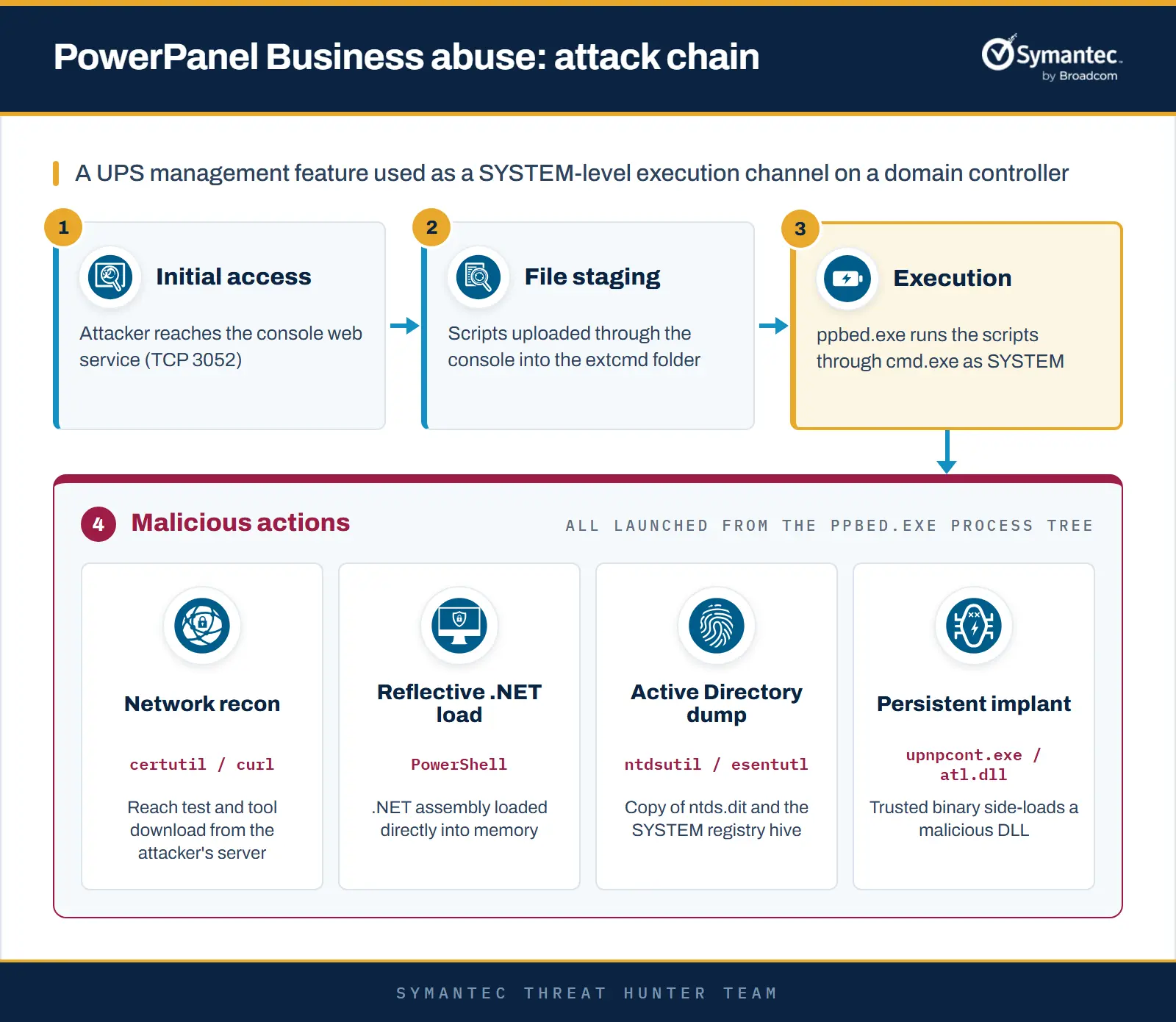
That feature became the attacker’s way in. As Symantec puts it, the feature “simply accepts a script, stores it, and runs it as SYSTEM through a signed service.” No memory-corruption exploit was needed. No new service or scheduled task was needed either.
Uploading scripts through the web console
The attacker sent files to the PPB web console’s upload endpoint. Each script landed in the product’s command folder with a name like PPB’s own files. Then the PPB service ran it. As a result, every command traced back to ppbed.exe, a trusted process.
A remote shell in disguise
The attacker never used real power events. Instead, they treated the feature as a remote shell. They used certutil and curl to fetch tools and tested reflective .NET loading with a harmless “hello” program. They also downloaded a .NET antivirus killer.
Trial and error on ntds.dit
Next, the attacker went after ntds.dit, the Active Directory credential database. They first tried ntdsutil. After several failed rounds, they switched to esentutl and a shadow copy to copy the locked file. They also saved the SYSTEM registry hive.
Symantec says this write-test-adjust cycle “bears the hallmarks of an interactive operation with a human at the keyboard.”
A side-loaded implant
Finally, the same channel launched upnpcont.exe from an odd system profile folder. The file name belongs to a Microsoft UPnP component. However, it loaded an unknown atl.dll from the same folder, which is a classic DLL side-loading pattern.
Who is behind it
Symantec has not tied the activity to any known group, and no suspects have been named. The motive also remains unclear. Symantec saw no data theft or ransomware.
It is still unknown how the attacker reached the CyberPower PowerPanel Business console. Public advisories describe hard-coded credentials, a default admin password, and a path-traversal upload flaw in PPB. According to Symantec, any of these, or stolen admin credentials, “could give an attacker the necessary console access.”
Impact and scale
Symantec analyzed one intrusion. Even so, the stakes of a domain controller attack like this are high. PPB often runs on hypervisors, database servers, file servers, and domain controllers. Those are the systems “that an intruder most wants to control.”
In telemetry, the activity looks like power software opening a command prompt. Defenders could easily dismiss that as routine. A copied ntds.dit file also exposes every domain account’s password hash.
How to stay protected
Symantec’s advice includes:
- Find every PPB console and limit its management port to named admin hosts.
- Never expose the console to the internet, other servers, or user networks.
- Change the default admin password and keep PPB patched.
- Audit PPB’s command folders and treat unknown scripts as hostile.
- Alert when ppbed.exe launches cmd.exe, PowerShell, certutil, ntdsutil, or esentutl.
- If you find these signs, assume AD credentials are exposed and plan a krbtgt reset.
In short, this domain controller attack shows that UPS tools need the same care as remote management software. Treat any server running CyberPower PowerPanel Business as a high-value asset.
Support Our Threat Intelligence
Find our threat intelligence and malware analysis helpful? Support our work today and unlock a 100% ad-free reading experience!
 Buy Me a Coffee
