Token Replay Attack Hits 79 Organizations Through Stolen Microsoft 365 Sessions
 Do Son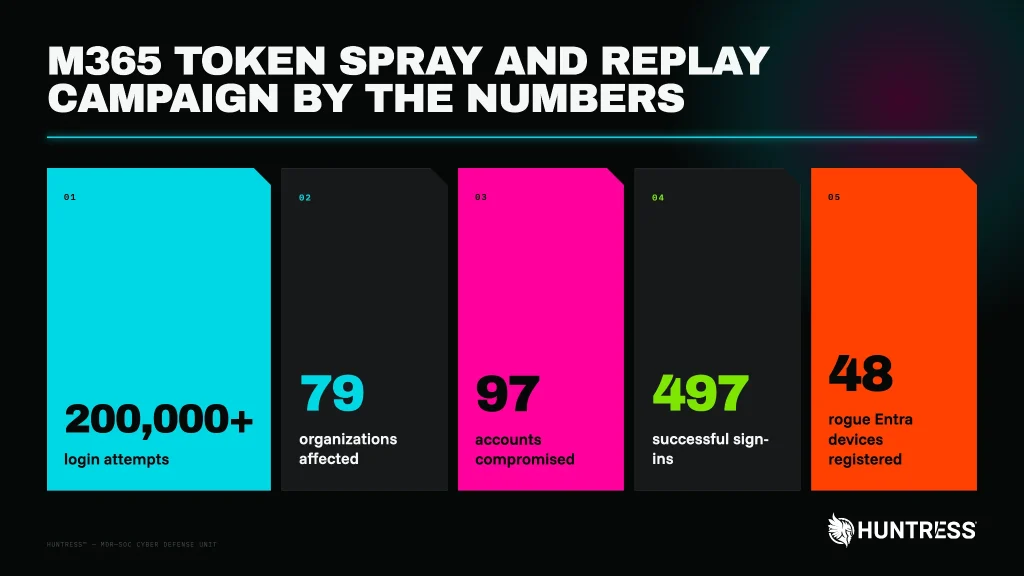
Overall statistics of the activity Huntress observed | Image: Huntress
| At a glance | |
| Actor | Unknown operator using rented hosting and VPN infrastructure |
| Activity | AiTM phishing, device-code phishing, token replay, and business email compromise |
| Targets | Microsoft 365 users at 79 organizations, per Huntress |
| Scale | 497 successful sign-ins and more than 200,000 failed attempts |
| Status | No law-enforcement action reported |
| Source | Huntress research, with Microsoft Entra ID Protection detections |
TL;DR
Between July 14 and September 22, 2026, a token replay attack campaign broke into Microsoft 365 accounts at 79 organizations. The attacker stole sign-in sessions after victims passed MFA, then reused them from rented servers. Huntress saw rogue devices, new authenticator apps, and hidden inbox rules that set the stage for Microsoft 365 BEC.
What happened
The attacker never needed a password. Instead, victims signed in through adversary-in-the-middle (AiTM) relays that copied their session tokens. Because these tokens are issued after MFA, the attacker could log in without facing MFA again. Some tokens also came from device-code phishing.
Next, the stolen tokens reappeared from servers at German hosting provider 1337 Services GmbH. On one occasion, the gap between capture and replay was just four minutes. Huntress calls this “token spraying,” which it describes as “the same pattern as password spraying, but with stolen tokens instead of guessed passwords.”
Building lasting access
The attacker registered at least 48 rogue devices in victims’ Entra directories. Each had a name that looked like a normal Windows PC. In 19 organizations, the attacker also wiped the victim’s MFA methods and added a new authenticator within three hours.
That step matters. As Huntress explains, a rogue authenticator lets the attacker pass MFA again, and “that access survives a password reset.”
Hidden inbox rules came next, a common step in Microsoft 365 BEC. They had short names such as “s” or “.” and moved mail to obscure folders. In one case, a rule hid all mail from an outside accountant. The attacker then sent that contact a payroll-related email.
Who is behind it
Huntress has not attributed the campaign to any known group. Microsoft Entra ID Protection independently flagged several of the replay addresses. It described them as linked to “nation state actors or cyber crime groups.” However, neither company has named an actor.
Impact and scale
Across the token replay attack, Huntress counted 497 successful sign-ins and more than 200,000 failed attempts. During one four-day burst in September, a single address logged 303 successful sign-ins across 29 organizations. Conditional Access blocked 1,052 more attempts, but all of those came from just four organizations.
The attacker also rotated through six addresses in the same block. Blocking one address would have stopped one phase at most.
How to stay protected
To stop a token replay attack, Huntress recommends these steps:
- Require MFA or block access for all users, cloud apps, and client app types through Conditional Access.
- Revoke sessions as well as resetting passwords. A reset alone leaves rogue devices and MFA methods in place.
- Audit Entra devices and remove any you do not recognize.
- Check for MFA methods that were cleared and re-added within minutes.
- Review inbox rules with very short names or rules that target payroll and banking terms.
- Restrict device-code sign-in flows.
Support Our Threat Intelligence
Find our threat intelligence and malware analysis helpful? Support our work today and unlock a 100% ad-free reading experience!
 Buy Me a Coffee
