 Do Son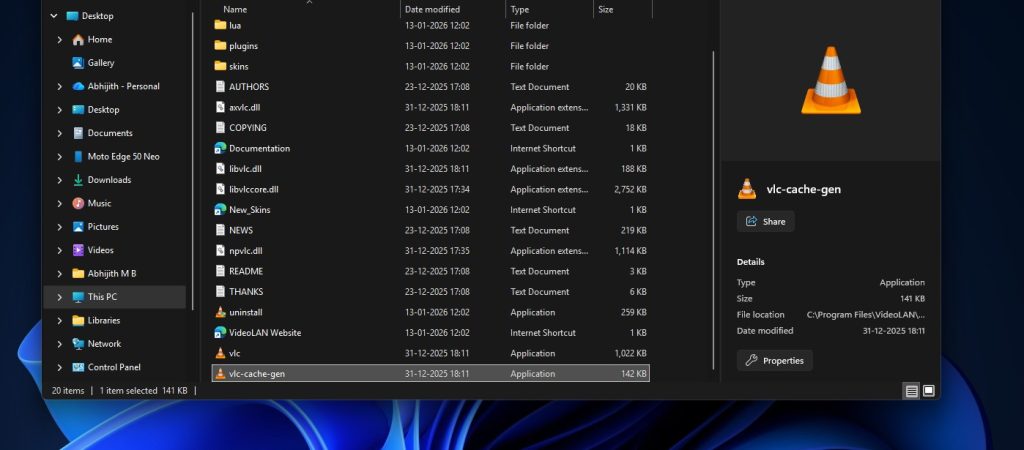
Recently, some users experienced issues when playing audio files with the open-source VLC media player. The playback freezes for thirty seconds and subsequently fails. The system then displays new file-opening options. It recommends the default Windows 11 media player. Consequently, many users remain entirely baffled by this underlying problem.
The Root Cause Revealed
However, the VLC development team has now confirmed the root cause. This disruption does not stem from an inherent flaw within VLC itself. Instead, Microsoft Defender incorrectly isolated the plugin cache utilized by VLC. In fact, VLC blames a Windows 11 bug for slow performance and strongly defends open-source development. As a result, VLC encounters anomalies when attempting to play specific media formats.
Resolving the Playback Anomalies
Reinstalling or Regenerating the Cache
According to developer instructions, affected users must reinstall the VLC player. Alternatively, they can manually regenerate the plugin cache. Both methods successfully restore normal plugin functionality. Meanwhile, Microsoft likely released an update to rectify this Defender false positive. Yet, standard virus definition updates rarely restore previously quarantined items automatically. Therefore, users must initiate the restoration process themselves.
The Broader Context of False Positives
False positives frequently occur during routine Microsoft Defender definition updates. Previously, the system incorrectly blocked Google Chrome and even Microsoft’s own Edge browser. However, Microsoft Defender comes pre-installed and activated by default within Windows 11. Consequently, when errors emerge, the resulting impact on users is exceptionally widespread and disruptive.
Support Our Threat Intelligence
Find our tech and OS security coverage helpful? Support our work today and unlock a 100% ad-free reading experience!
 Buy Me a Coffee
