Phishing Campaign Abuses Microsoft Power BI to Install Rogue ScreenConnect Clients
 Do Son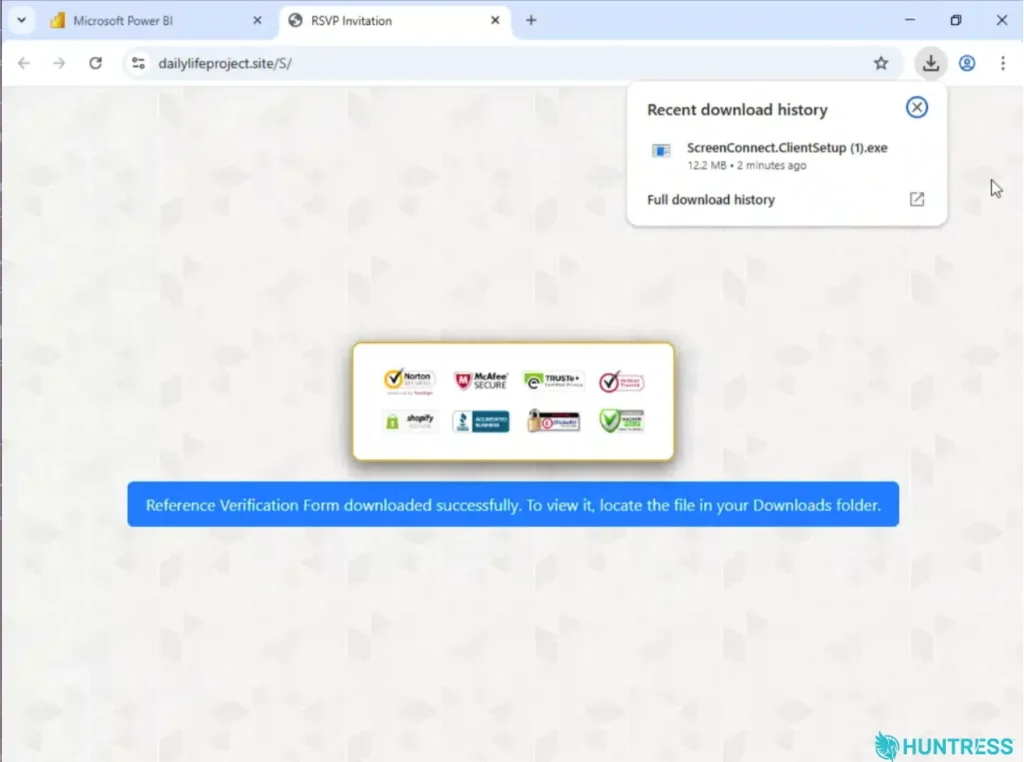
A new tab opened and kicked off the download of a rogue RMM | Image: Huntress
At a Glance
| Malware family | Rogue ScreenConnect clients and a defense evasion tool |
| Threat actor | Unknown; no attribution |
| Targets | A handful of endpoints, plus 22 more linked by a retroactive hunt (Huntress figures) |
| Delivery vector | Outlook phishing emails linking to a public Power BI report |
| Key capabilities | Victim fingerprinting, delayed auto-download, dual remote access, scheduled-task persistence |
| Sources | Huntress; Microsoft |
TL;DR
Attackers hosted a fake document on Microsoft Power BI to slip past email filters. A “Download Reference” button led to a site that checked visitors and then pushed a ScreenConnect installer. Two remote access clients gave the attackers a backup way back in.
Delivery
The emails linked to a real Power BI page. It showed a blurred form and a “Download Reference” button. Because the link pointed to Microsoft’s own domain, it “skirts through Microsoft 365 mail filters and other security gateways,” Huntress notes.
Infection Chain
Screening Victims First
Clicking the button opened a new tab on an attacker site. That page fingerprinted the browser, OS, screen size, and signs of automation. One variant allowed only Windows desktops. Visitors who failed the checks went to a decoy page instead.
A Delayed Download
Real targets waited a few seconds. Then a script clicked a hidden link and downloaded a ScreenConnect installer. Meanwhile, the page claimed a “Reference Verification Form” had downloaded.
Two Rogue ScreenConnect Clients
The installer set up a first ScreenConnect client. That client then installed a second one tied to a different server. In one case, a script removed the first client afterward, likely to avoid detection. As Huntress explains, multiple tools mean that “even if one RMM is rooted out, another one remains.”
Next, the attackers ran a tool to hide their activity from users and security software. In one incident, they also added a scheduled task that reran their script every two minutes. Huntress’s SOC shut the attack down at that point.
Command-and-Control and Data Theft
The landing pages sent each victim’s IP address, location, browser, and OS to a Telegram bot. After that, the rogue ScreenConnect clients gave the attackers full remote control. Huntress did not report any confirmed data theft.
A Wider Trend
This dual-RMM approach is spreading. In late September, Microsoft described phishing that used MSP360 to install ScreenConnect. Microsoft said the pair gave attackers “redundant remote administration channels.” Neither campaign has been tied to a named group.
Defense and Detection Guidance
Huntress urges teams to treat links on trusted cloud services with care. To counter Power BI phishing and rogue ScreenConnect installs:
- Restrict remote management tools to approved instances only.
- Alert on new ScreenConnect installs or links to unknown instances.
- Investigate any endpoint running more than one RMM client.
- Watch for scheduled tasks tied to remote access scripts.
- Train users to report trusted-looking links that trigger downloads.
Support Our Threat Intelligence
Find our threat intelligence and malware analysis helpful? Support our work today and unlock a 100% ad-free reading experience!
 Buy Me a Coffee
