 Do Son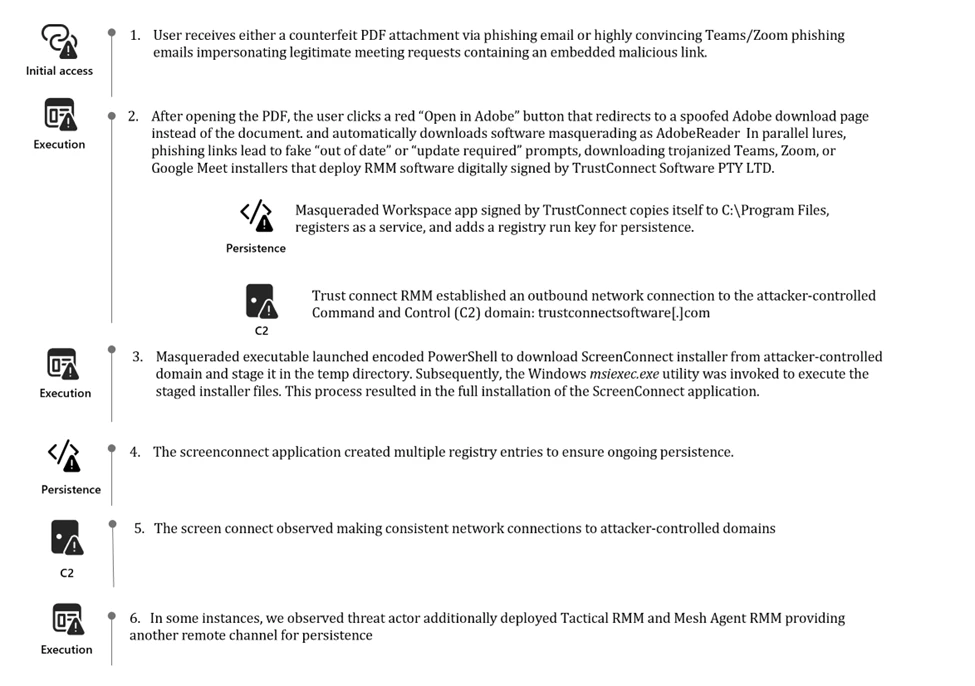
Security researchers at Microsoft Defender Experts have uncovered a sophisticated phishing campaign that turns the tools of corporate productivity against the enterprise. By abusing “familiar branding and trusted digital signatures,” an unknown threat actor has been successfully bypassing user suspicion to deploy a suite of remote monitoring and management (RMM) backdoors on compromised systems.
The campaign is a masterclass in deception, utilizing everything from fake meeting invitations to Extended Validation (EV) certificates to gain an initial foothold.
The attack chain typically begins with a deceptive phishing email. In one variant, victims receive a “counterfeit PDF attachment” that displays a blurred image, mimicking a restricted or encrypted document.
A prominent red button labeled “Open in Adobe” redirects users to a spoofed webpage that mimics Adobe’s official download center.
Another campaign uses “highly convincing Teams and Zoom phishing emails” that impersonate project bids, financial communications, or meeting transcripts.
In both cases, the user is prompted to download an “update” or “installer.” While these files masquerade as legitimate software like msteams.exe or adobereader.exe, they are actually malicious RMM packages.
To bypass modern security warnings, the threat actor signed their malicious executables with a valid EV certificate issued to TrustConnect Software PTY LTD. This tactical choice is designed to “bypass user suspicion and gain an initial foothold in enterprise environments”.
Once a victim executes the signed installer, the malware goes to work:
- Reinforcing Legitimacy: The application creates a secondary copy of itself under C:\Program Files to appear as a system-installed program.
- Persistence: It registers itself as a Windows service and creates a Run key in the registry to ensure it launches automatically at startup.
- Command and Control: The service establishes an outbound connection to the attacker’s C2 domain: trustconnectsoftware[.]com.
The threat actor does not rely on a single access point. Instead, they deploy a trio of RMM tools—ScreenConnect, Tactical RMM, and MeshAgent—to “strengthen foothold redundancy and expand control across the environment”.
The report highlights a particularly deliberate design for long-term access. The installed ScreenConnect backdoor, for instance, is “repurposed” and “deeply integrated into critical system service keys”. These registry entries contain “encoded identifiers, callback tokens, and connection metadata,” enabling the attacker to seamlessly re-establish access even after system restarts.
As Microsoft researchers noted: “The use of multiple RMM frameworks within a single intrusion demonstrates a deliberate strategy to ensure continuous access, diversify C2 capabilities, and maintain operational resilience”.
This campaign serves as a stark reminder that digital signatures alone are not a guarantee of safety. Organizations should:Verify Signing Certificates:
- Monitor for unusual certificates, such as those from “TrustConnect Software PTY LTD,” and check for revoked signatures.
- Monitor RMM Usage: Audit the environment for unauthorized RMM tools like Tactical RMM or unsigned ScreenConnect installers.
- User Education: Train employees to scrutinize “update required” prompts from unofficial websites, even when the branding appears legitimate.
Support Our Threat Intelligence
Find our threat intelligence and malware analysis helpful? Support our work today and unlock a 100% ad-free reading experience!
 Buy Me a Coffee
