Over 400,000 WordPress Sites at Risk as “Breeze” Plugin Zero-Day Is Exploited in the Wild
 Do Son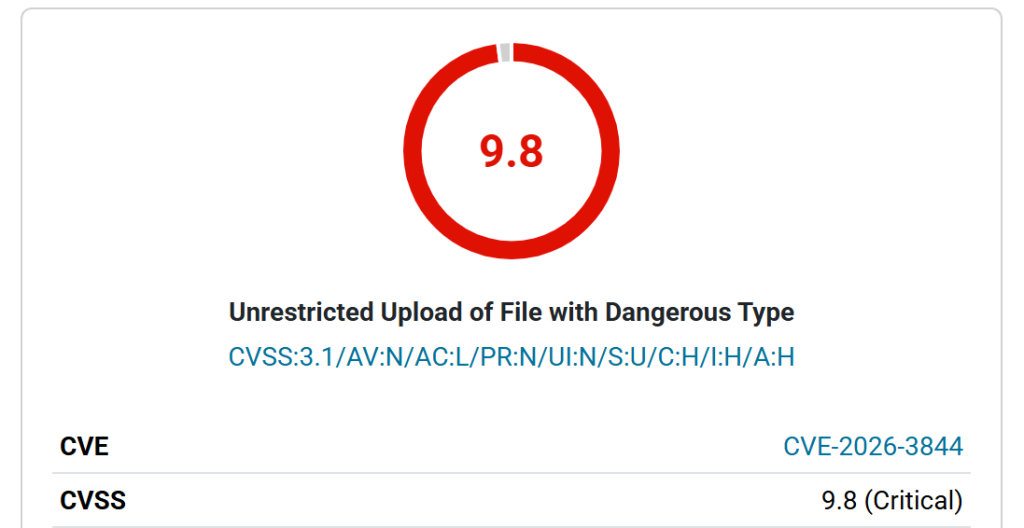
A major security threat is currently sweeping through the WordPress ecosystem. Breeze, a highly popular caching plugin developed by the Cloudways team and active on over 400,000 websites, is under active attack. Security researchers at Wordfence have reported a critical surge in malicious activity, blocking 172 attacks targeting a newly disclosed vulnerability in just the last 24 hours.
See a WordPress CVE's exploit risk spike before it becomes a headline.
Get EPSS spike alertsThe flaw, tracked as CVE-2026-3844, carries a CVSS severity score of 9.8 (Critical). The vulnerability stems from an “Unrestricted Arbitrary File Upload” flaw located within the plugin’s fetch_gravatar_from_remote function.
The issue arises because the plugin fails to perform any file type validation when fetching profile images (Gravatars) from remote sources. This oversight creates a critical security gap.
An unauthenticated attacker can trick the server into fetching a malicious file—such as a PHP web shell—instead of a standard image. Once the file is uploaded to the server, the attacker can execute it remotely, effectively gaining full control over the website.
While the risk is severe, the vulnerability is not “exploitable by default.” It requires a specific setting—”Host Files Locally – Gravatars”—to be enabled within the Breeze settings. While this feature is disabled by default, many users enable it to improve their site’s privacy and performance.
The 172 blocked attacks in a single day indicate that threat actors have already developed automated scripts to scan for and exploit vulnerable Breeze installations.

For site owners, this means that if you have “Host Files Locally” enabled and are running an outdated version of Breeze, your server may already be hosting unauthorized backdoors.
The Cloudways team has moved quickly to address the threat, releasing a patched version of the plugin.
To secure your site, follow these steps immediately:
- Update to Version 2.4.5: Check your WordPress dashboard and update Breeze to the latest version without delay.
- Review Your Settings: If you cannot update immediately, ensure that “Host Files Locally – Gravatars” is disabled in the Breeze “Basic Options” or “Miscellaneous” settings.
- Scan for Malicious Files: Use a security scanner to check your
/wp-content/uploads/directory for any unexpected PHP files that may have been uploaded during the exploit window.
Support Our Threat Intelligence
Find our vulnerability reports and weekly recaps helpful? Support our work today and unlock a 100% ad-free reading experience!
 Buy Me a Coffee
