 Do Son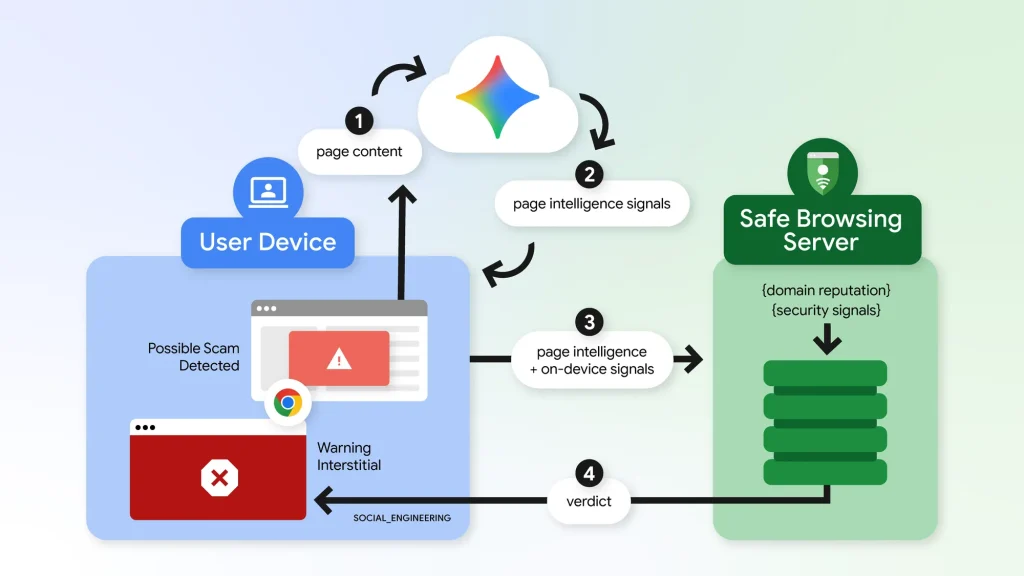
Google Upgrades Enhanced Protection in Chrome
Google has unveiled new Enhanced Protection features for Chrome, detailed in its post on the latest defenses against evolving web scams. The additions check suspicious site pop-ups, spot scams with cloud-based Gemini AI, and detect ClickFix commands.
The features target users who have turned on Enhanced Protection. They cover several stages, from a warning about a risky page to the moment a user copies a suspicious command.
Watching the Clipboard for Dangerous Commands
ClickFix scams, also called click-to-fix scams, run on phishing sites. The pages show a fake CAPTCHA or a fake system error. Then they urge the victim to copy a command into a PowerShell or CMD window.
What the user copies may differ entirely from what the page displays. Moreover, the execution happens outside the browser. As a result, normal download checks cannot stop this kind of attack.
How Chrome Responds
Chrome first checks whether the user is on a low-reputation site. If the user then clicks to copy a command, Chrome removes personally identifiable information from the clipboard. It then sends the contents to cloud Safe Browsing for analysis.
If Safe Browsing judges the command dangerous, Chrome shows a warning. Google stresses that the process does not monitor the clipboard continuously. Users who still worry can turn off Enhanced Protection.
Two Levels of Site Warnings
Chrome now shows two kinds of warnings, depending on the level of risk.
Suspicious Site Pop-Up
When a page shows common traits of phishing, malware, or scams but Chrome has low confidence, it shows a suspicious site pop-up. Users can stop browsing. If they are sure the site is safe, they can continue.
Dangerous Site Full-Screen Warning
For confirmed malicious and high-risk sites, Chrome keeps its red full-screen warning, which interrupts the visit. Google says this tiered design lets Chrome flag risky sites better. It also reserves hard blocks for high-confidence threats.
Cloud-Based Gemini Scam Detection
Until now, Chrome used a local Gemini model to spot scam sites, and only on some devices. The new version switches to cloud-based detection. The AI can now catch common scams such as fake antivirus sites and forged browser updates, and Chrome blocks access to them.
Safe Browsing weighs Gemini’s analysis of the page text, the domain’s reputation, and other security signals. Chrome sends page text only when the page shows strong signs of a scam.
Privacy Commitments
Google says it handles this text only temporarily. It does not log the text, keep it, or use it for model training.
Support Our Threat Intelligence
Find our tech and OS security coverage helpful? Support our work today and unlock a 100% ad-free reading experience!
 Buy Me a Coffee
