 Do Son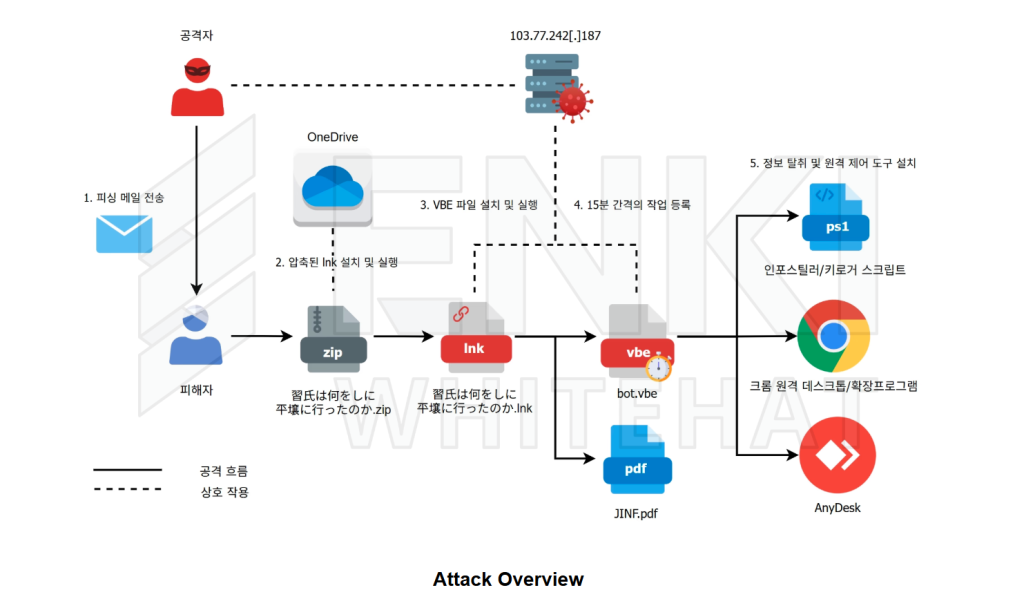
Image: ENKI WhiteHat
At a glance
| Actor / Group | Kimsuky (suspected North Korea-linked threat actor) |
| Activity Type | Spear phishing, email exfiltration, covert remote access |
| Targets / Victims | Policy, diplomatic, and academic targets in South Korea and Japan |
| Scale | Multiple regional campaigns identified throughout early 2026 |
| Jurisdiction / Status | Active threat monitoring; no formal indictments announced |
| Source | ENKI WhiteHat Threat Research Team |
Cybersecurity researchers at ENKI WhiteHat uncovered active Kimsuky spear phishing campaigns targeting organizations in South Korea and Japan during early 2026. The threat actors distribute malicious shortcut files to deploy backdoor scripts and steal sensitive emails. In addition, the operators install legitimate remote control software and artificial intelligence generated browser extensions to maintain persistent unauthorized access.
What Happened During the Attacks
The threat actors initiate their operations through tailored phishing emails. In their official analysis, ENKI WhiteHat noted, “We identified several Kimsuky spear phishing campaigns against South Korean and Japanese targets in the first half of 2026.”
These phishing messages deliver links to archives stored on Microsoft OneDrive. Inside the downloaded archives, victims encounter Windows shortcut (LNK) files disguised as legitimate documents. For instance, Japanese recipients received lures referencing regional geopolitical analyses. When a victim opens the file, an embedded command executes in the background. The script retrieves a decoy document to divert suspicion. At the same time, it downloads an obfuscated VBScript file named bot.vbe.
The script then establishes persistence on the host. Specifically, it creates a scheduled task named Chrome_Update that runs the VBScript every 15 minutes. This task contacts command-and-control servers to request subsequent attack payloads.
Automated Data Theft and Keylogging
Once established, the backdoor runs PowerShell scripts to collect sensitive information. First, the malware inventories installed security software and system specifications. Next, specialized extraction scripts harvest local email archives.
The attack targets both Mozilla Thunderbird and Microsoft Outlook clients. For Thunderbird, the script extracts mailbox archives and saves messages into separate files. For Outlook, it gathers every email and attachment sent or received since January 2026. Furthermore, the operators deploy an in-memory keylogger using custom C# code under the namespace Masakoyoji.Komori. This tool records user keystrokes into a hidden local log file to capture account credentials.
Abuse of Commercial Remote Control Tools
To bypass endpoint defenses, the threat actors deploy legitimate administrative software. The researchers noted, “The threat actor also installed legitimate remote control software such as Chrome Remote Desktop and AnyDesk to slip past antivirus detection and open up several routes for remote access.”
To deploy Chrome Remote Desktop, the attackers use the Windows fodhelper.exe binary. This technique allows the installer to bypass User Account Control prompts without notifying the user. The program then runs automatically and binds the computer to an attacker-controlled Google account.
In other instances, the group installs AnyDesk using a batch script. The script hides AnyDesk application windows, removes taskbar icons, and deletes system tray indicators. Consequently, the user remains completely unaware of active remote sessions.
Generative AI Browser Extension
The operators also deploy a custom Chrome extension to monitor webmail activity. The extension intercepts messages directly inside the Gmail web interface. It extracts recipient addresses, subjects, message bodies, and attachments before transmitting them to an external server.
Analysis reveals that the extension source code contains extensive Korean comments and debug strings. According to the research team, “The JavaScript in the Chrome extension used to steal Gmail data carries the hallmarks of generative AI throughout, from the detailed comments to the debug strings and Unicode emoji.” This pattern indicates the operators used generative artificial intelligence tools to produce the functional extension code rapidly.
Who Is Behind the Campaign
Security researchers attribute these operations to the suspected North Korean advanced persistent threat group known as Kimsuky. The techniques and infrastructure align closely with past Kimsuky activity.
For example, the AnyDesk installation routines share identical script save paths and file naming conventions with a known 2025 Kimsuky operation. Furthermore, the threat actors compromised legitimate South Korean web servers to host their command infrastructure. ENKI WhiteHat stated, “We therefore assess with high confidence that the threat actor is a Korean-speaking operator, further reinforcing the link to Kimsuky, a North Korea linked group.”
Impact and Regional Scale
These Kimsuky spear phishing operations demonstrate sustained espionage efforts against Northeast Asian organizations. The attackers focus heavily on policy institutes, academic specialists, and government-affiliated targets in Japan and South Korea. By combining email theft with remote desktop access, the operators gain unrestricted control over target networks. Because the group abuses trusted commercial tools, traditional security scanners frequently overlook the unauthorized access channels.
How to Stay Protected Against Covert Remote Access
Defending against these intrusions requires proactive administrative audits. Organizations should not rely entirely on automated antivirus solutions.
Inspect Scheduled Tasks and Startup Items
Administrators must routinely audit Windows Task Scheduler for unusual entries. Look for unregistered tasks executing wscript.exe or PowerShell scripts from user application data directories.
Audit Remote Control Software
Security teams should inventory all installed remote management tools. Verify whether tools like AnyDesk or Chrome Remote Desktop have legitimate business justifications.
Review Browser Extensions
Finally, inspect installed browser add-ons across enterprise endpoints. Remove any unrecognized extensions requesting broad permissions over all web traffic.
Support Our Threat Intelligence
Find our threat intelligence and malware analysis helpful? Support our work today and unlock a 100% ad-free reading experience!
 Buy Me a Coffee
