Stealth Cryptominer Uses USB LNK and DLL Side-Loading to Deploy “Smart Mining” Evasion
 Do Son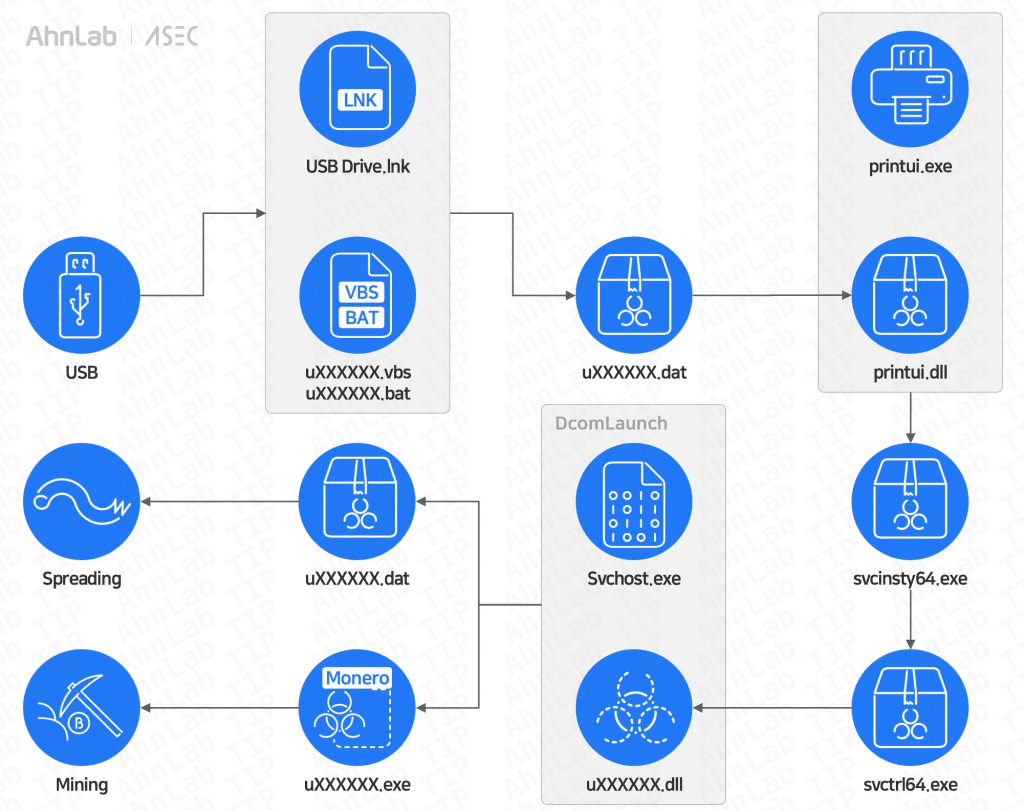
Image: ASEC
In an era dominated by cloud vulnerabilities and phishing emails, a classic threat vector has made a quiet but dangerous resurgence. A sophisticated malware campaign is actively spreading via USB drives in South Korea, turning infected workstations into unwitting crypto-mining zombies.
According to a February 2025 report by the AhnLab SEcurity intelligence Center (ASEC), attackers are deploying a new strain of CoinMiner malware that abuses legitimate Windows system files to evade detection. This campaign, also tracked by Mandiant under the malware families DIRTYBULK and CUTFAIL, reveals a significant evolution in how threat actors are repurposing old-school infection methods for modern financial gain.
The infection begins the moment a user plugs in a compromised USB drive. Instead of their expected files, they are greeted by a single shortcut file named “USB Drive.lnk”.
The actual user data is not gone; it has been moved into a hidden folder named “USB Drive” inside a hidden directory called “sysvolume”. When the user clicks the shortcut—believing they are opening their drive—they unknowingly trigger a chain reaction:
- The shortcut executes a VBS script (e.g., u566387.vbs) hidden in the sysvolume folder.
- This script launches a BAT file (e.g., u643257.bat).
- Crucially, the BAT file opens the real hidden folder containing the user’s files, so the victim sees their data and assumes everything is normal.
Behind the scenes, the malware employs a technique known as DLL Side-Loading to gain persistence and evade antivirus detection.
The malicious BAT script creates a new directory with a deceptive name: C:\Windows \System32\ (notice the space after “Windows”). It then performs a “bait-and-switch”:
- It copies the legitimate Windows executable printui.exe into this new folder.
- It copies a malicious file (u211553.dat) into the same folder but renames it to printui.dll.
Because printui.exe is a trusted Windows component designed to manage printer user interfaces, security tools often ignore it. However, when executed from this specific folder, it automatically loads the malicious printui.dll instead of the legitimate system library.
The Dropper Chain: Once loaded, printui.dll initiates a multi-stage infection:
- Stage 1: Drops svcinsty64.exe in the System Directory.
- Stage 2: svcinsty64.exe drops svctrl64.exe.
- Stage 3: svctrl64.exe drops the final payload u826437.dll and registers it as a service under DcomLaunch to ensure it runs automatically every time the computer starts.
The ultimate goal of this campaign is financial: mining Monero cryptocurrency using the victim’s hardware. The final payload, identified as PrintMiner, configures the system to maximize mining efficiency while hiding its tracks.
Stealth and Evasion Tactics:
- Defender Bypass: It uses PowerShell commands to add its installation paths to the Windows Defender exclusion list.
- Insomnia: It modifies power settings to prevent the computer from entering sleep mode, ensuring 24/7 mining.
- Smart Mining: The malware installs XMRig, a popular open-source miner. However, it is configured to be “process-aware.” It actively scans for resource-intensive games (such as SanAndreas.exe, SCUM.exe, PUBG, etc.) and monitoring tools (like Taskmgr.exe, ProcessHacker.exe).
If a user launches a game or opens the Task Manager to check why their PC is slow, XMRig automatically suspends its activity to avoid detection.
Users are advised to enable the “Show hidden files” option in Windows Explorer to spot the sysvolume folder on USB drives and avoid clicking shortcut files (.lnk) that appear on removable media.
Related Posts:
- Warning: DLL Hijacking in Modern Malware Campaigns
- Tangerine Turkey Cryptomining Worm Spreads Via USB Drives, Hides Payloads with VBScript and LOLBins
- Beyond Cryptominers: A New Malware Strain Is Hijacking Exposed Docker APIs
- Security Expert Announces PoC to Crashes All Recent Windows
Support Our Threat Intelligence
Find our threat intelligence and malware analysis helpful? Support our work today and unlock a 100% ad-free reading experience!
 Buy Me a Coffee
